1. What is OKX Web3 Wallet?
Q: What is OKX Web3 Wallet?
OKX Web3 Wallet is a non-custodial, decentralized multi-chain wallet.
As a cold wallet, users have full control over private keys and asset management; assets are not held by the platform, providing greater security.
The wallet features a built-in cross-chain exchange trading aggregator DEX, a one-stop on-chain investment tool DeFi (Web3 earning), and a heterogeneous multi-chain aggregation trading platform (supporting Crypto, Ordinals, NFT), as well as DApp discovery.
With OKX Web3 Wallet, you can easily access over 1,000 DApp protocols, making it a true one-stop Web3 entry point.
Q: How to back up the wallet?
You can back up your wallet in the following 2 ways:
1. Back up the wallet via iCloud / Google Drive / Huawei Cloud
2. Physical storage, such as writing down the mnemonic phrase or private key and storing it in a secure location.
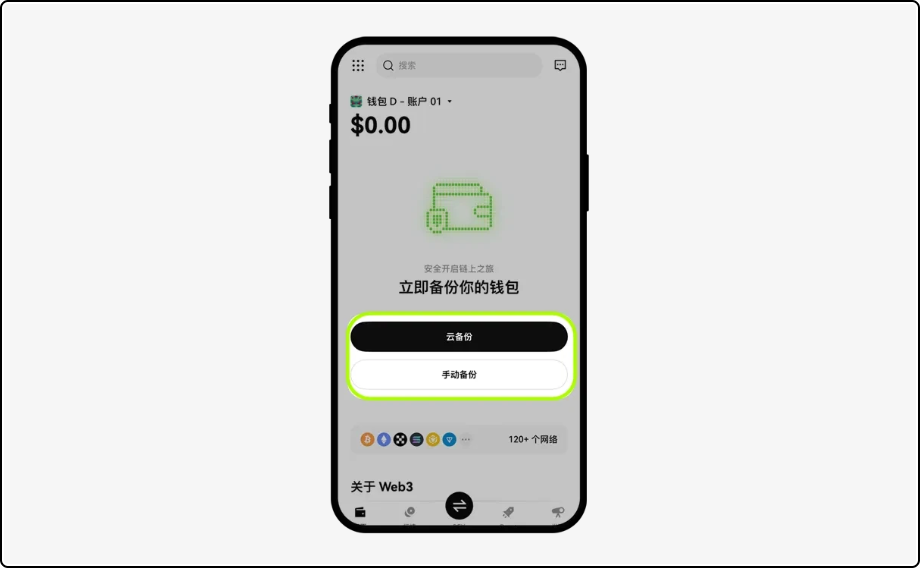
Remember: Be sure to securely back up your wallet mnemonic or private key; once lost, it cannot be recovered. Also, manage the mnemonic phrase well; if someone obtains your mnemonic phrase, they effectively have control over your wallet.
2. How to create or import OKX Wallet?
Web Version
1. Download the plugin wallet
You can open web3.okx.com in Google Chrome and use it with the OKX Wallet browser plugin.
Chrome browser app store download link:
The invitation code is: AICOIN88
Invitation link:
https://web3.okx.com/ul/joindex?ref=AICOIN88
2. How to create a wallet?
[1] Open the OKX Wallet plugin, select create wallet; open the plugin wallet, click [Create Wallet], set a password, and back up the mnemonic phrase. If you already have a wallet, you can use the mnemonic phrase or private key to directly import it for seamless viewing and management of assets, enjoying a smooth multi-chain experience.
[2] Backup the mnemonic phrase;
3. How to import a wallet?
If you already own a wallet, you can directly import the mnemonic phrase or private key into the OKX Web3 Wallet for seamless viewing and management of assets, enjoying a smooth multi-chain experience.
[1] Click import wallet;
[2] Select import mnemonic or private key;
[3] Enter the password setup interface and input the password to complete the import.
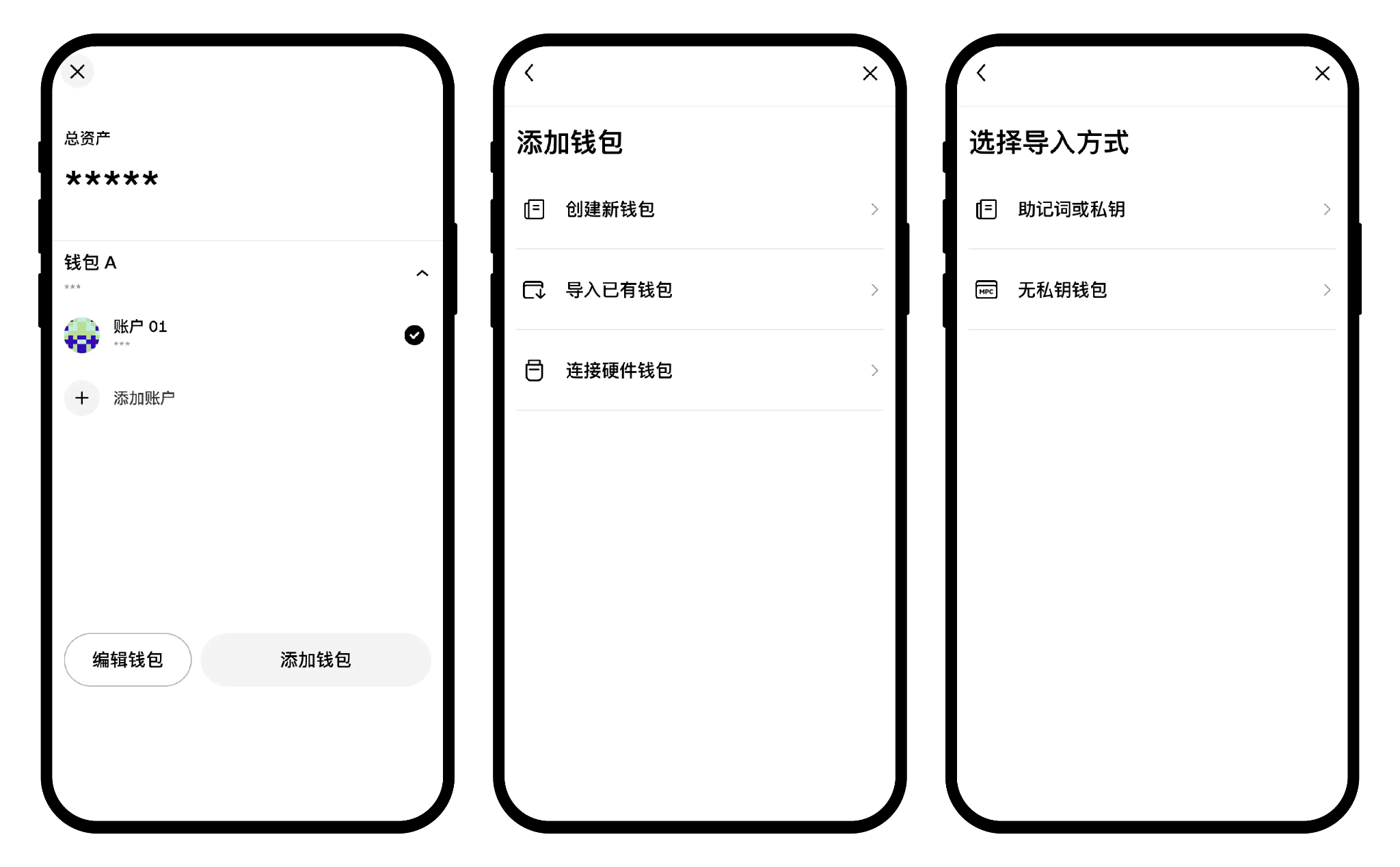
Note: Please keep your password and mnemonic phrase secure; we do not store your password and mnemonic phrase, and if lost, we cannot help you recover it, which may result in asset loss.
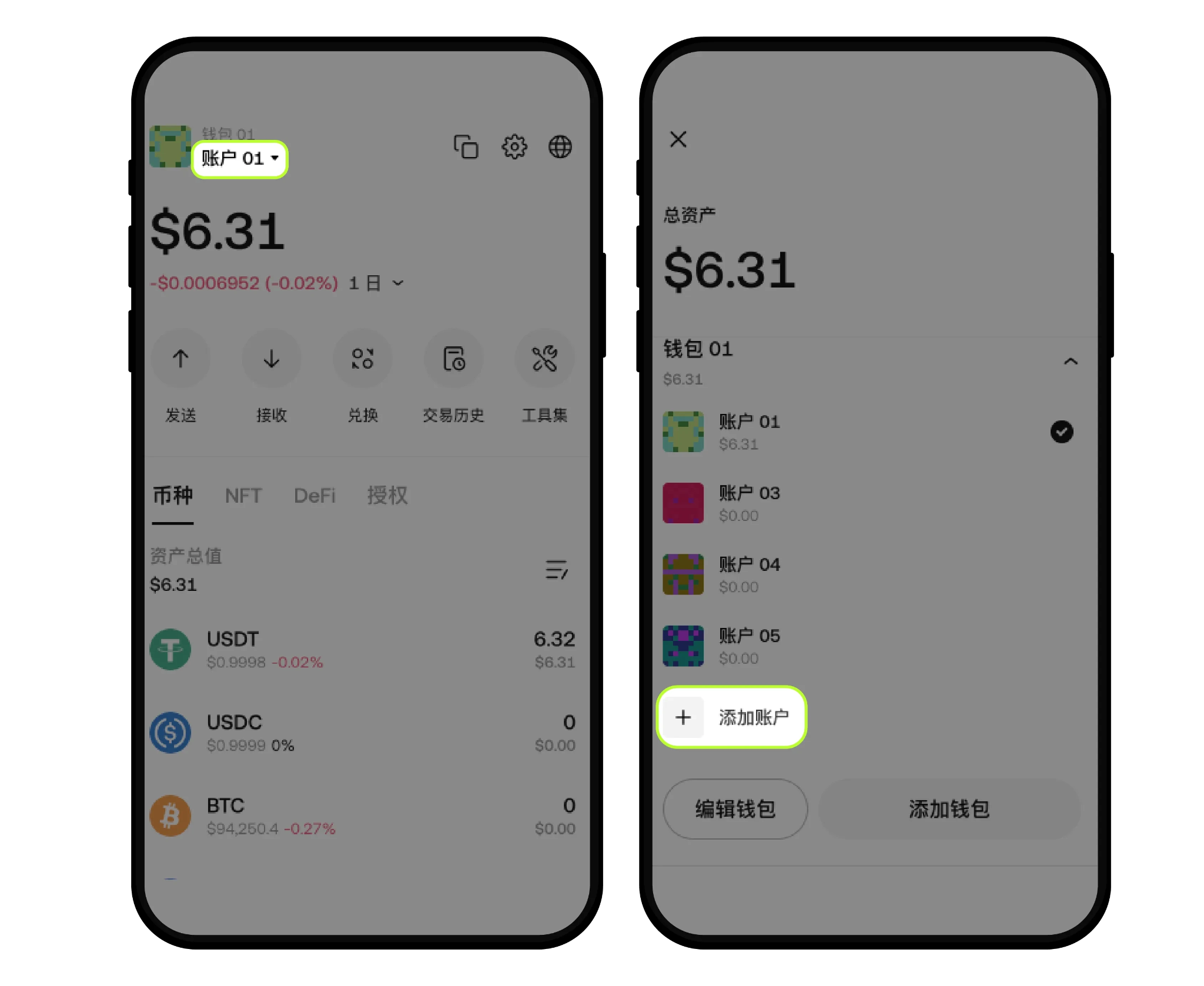
4. How to create a new account
Click on the wallet account name - [Add Account], to create a new account. For example, these accounts under wallet A share a set of mnemonic phrases, typically referred to as derived wallets. Wallets and accounts can also be renamed; click [Edit Wallet] - then click the account name - change the name - [Confirm].
5. How to use an observation wallet
An observation wallet refers to a wallet that allows viewing the asset overview, token types, NFTs, DeFi, authorizations, transaction history, etc. of an imported address or domain. The observation wallet can be understood as a blockchain explorer for a specific address.
Compared to a blockchain explorer, the advantage of an observation wallet is that 1) it can add multiple observation wallets simultaneously for easier tracking, 2) it aggregates multiple chains; currently, OKX Wallet supports over 80 chains, and as long as the observation wallet has assets on any of those chains, it will display them, allowing direct visibility of asset distribution across different chains, avoiding the hassle of switching between different chain browsers.
Web version: Click [Assets] - under profit and loss analysis [Wallet Account], click [Observation Wallet] - [Add New Wallet], enter the wallet address to add it.
Since it only imports addresses or domains, the observation wallet cannot directly conduct transfers or other on-chain operations; if you need to perform related operations, you need to import the mnemonic/private key into the wallet or use it in conjunction with a cold wallet for authorization.
6. How to view account analysis?
In the web version, click on assets to access the profit and loss analysis page for inquiry.
APP Version
1. Download the OKX Wallet App
Open the OKX Wallet official website and download the OKX Wallet App:
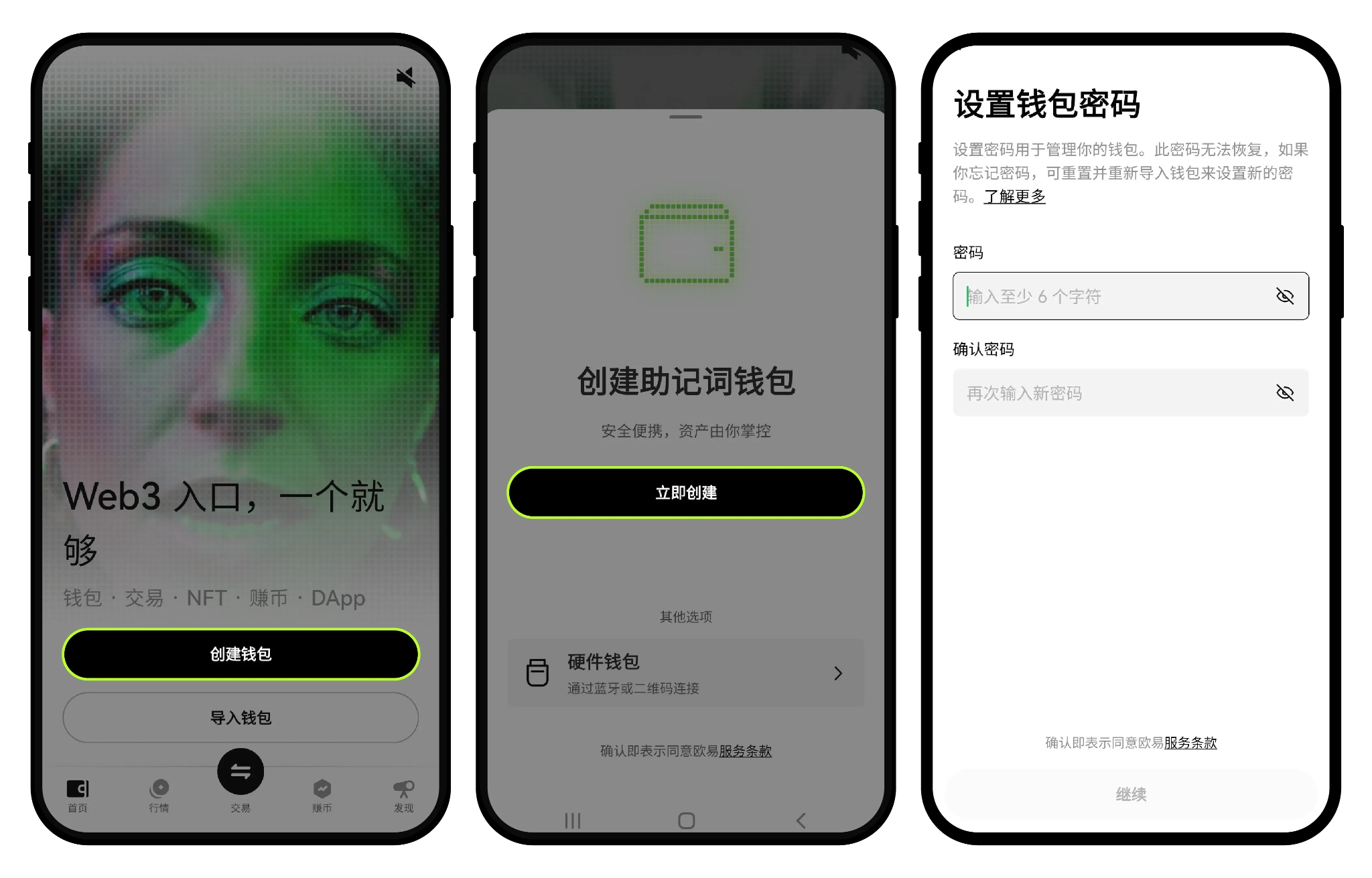
2. How to create a wallet?
[1] Open the Web3 Wallet, select [Create Wallet];
[2] Create your password;
[3] Backup the mnemonic phrase;
3. How to import a wallet?
If you already have a wallet, you can directly import the mnemonic phrase or private key into the OKX Web3 Wallet for seamless viewing and management of assets, enjoying a smooth multi-chain experience.
[1] Click import wallet;
[2] Select import mnemonic or private key;
[3] Enter the password setup interface, input the password to complete the import.
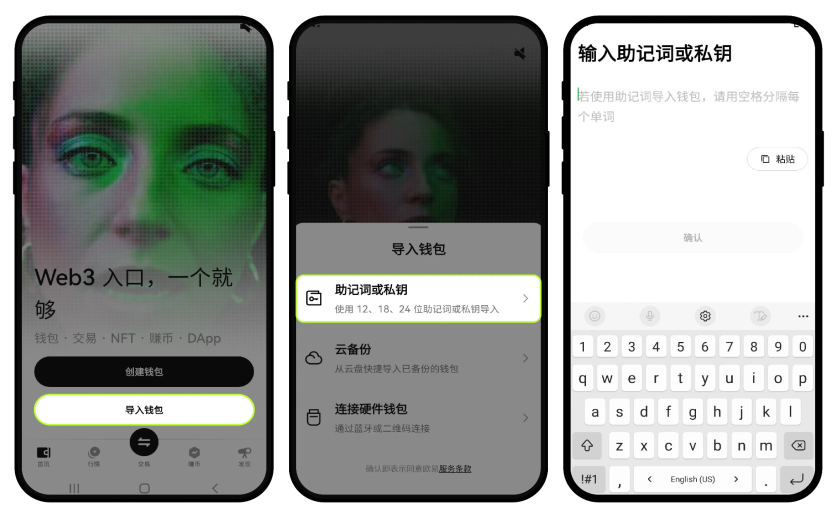
Note: Please keep your password and mnemonic phrase secure; we do not store your password and mnemonic phrase, and if lost, we cannot help you recover it, which may result in asset loss.
4. How to view and back up the mnemonic phrase or private key
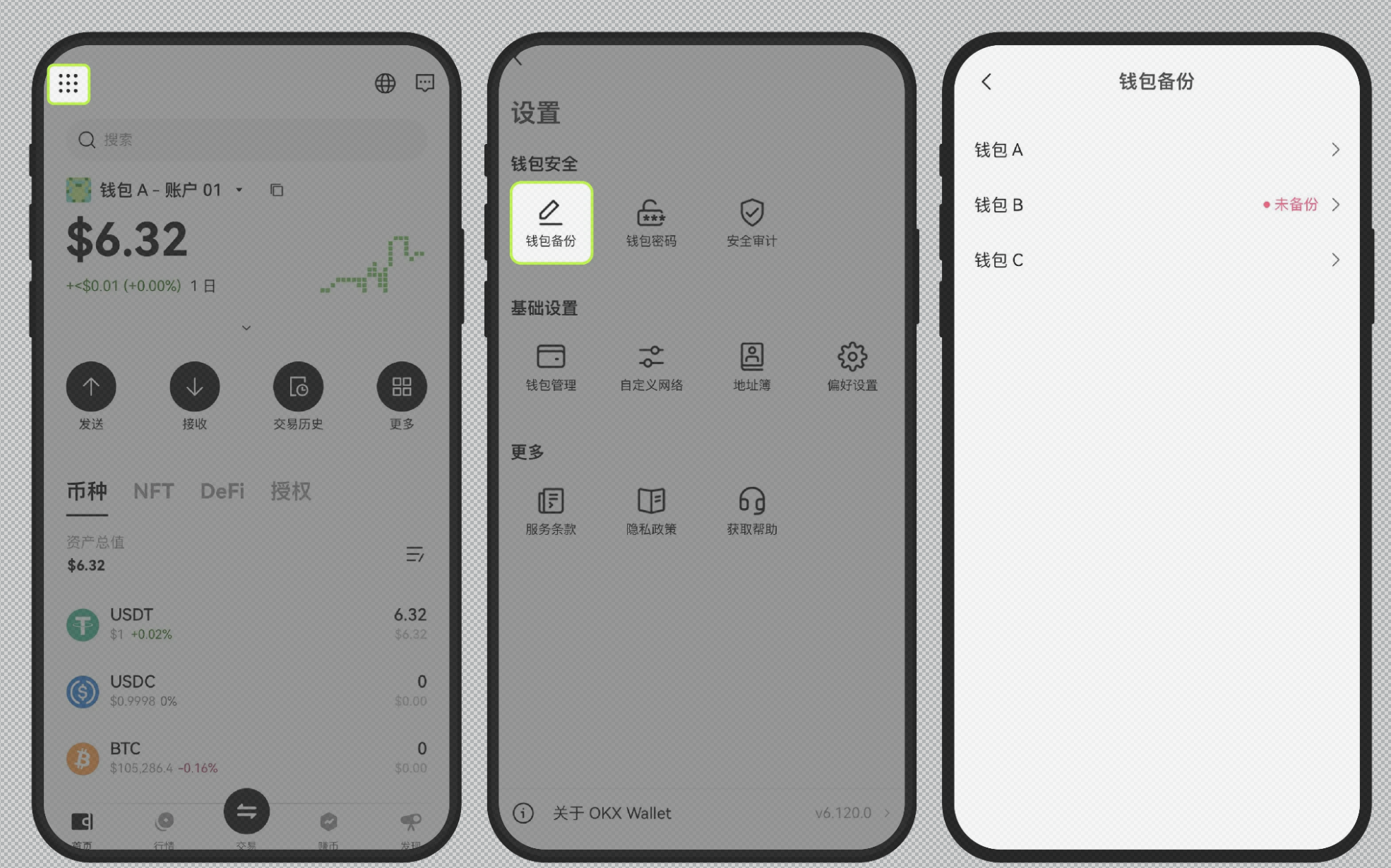
Open Web3 wallet - upper left corner [Full Function Icon] - [Wallet Backup]. Currently, it supports backing up mnemonic phrases or private keys. If it is a backup of the mnemonic phrase, the OKX Web3 Wallet adopts a method where a set of mnemonic phrases corresponds to one wallet (including derived wallets generated based on that wallet), meaning that having this set of mnemonic phrases allows management of crypto assets on over 70 public chains.
If it is a backup of the private key, be aware that different public chains might correspond to different private keys. (To ensure asset security, the platform has launched a secure copy private key function. Users can manually supplement the last 6 characters of the private key after clicking [Secure Copy])
5. How to create a new account
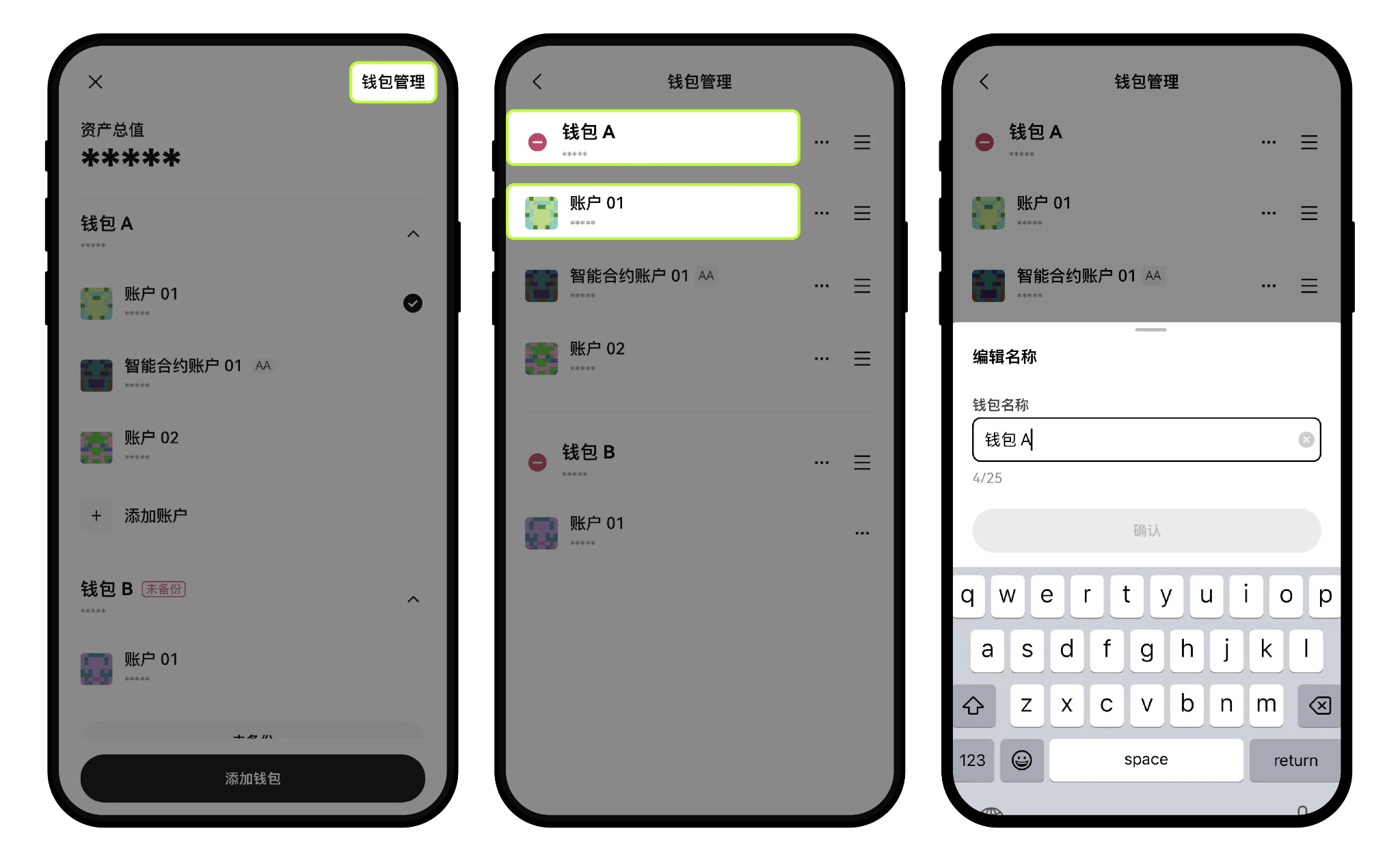
On the wallet homepage, click the wallet account name - find the corresponding wallet - [Add Account], to create a new account. For example, these accounts under wallet A share a set of mnemonic phrases, typically referred to as derived wallets.
Wallets and accounts also support renaming; click [Wallet Management] - enter the wallet management page - click the [ ... ] button on the right - modify the account name. Note that the App version currently does not support removing already created accounts; if you want to remove one, you need to remove the entire wallet from the device and then re-import it using the mnemonic phrase. If the wallet was imported using a private key, adding accounts is not supported.
Note: The wallet management page has added a fiat valuation feature. Users can view the total balance of that wallet and account under each wallet name.
6. How to modify the wallet or account name
On the wallet homepage, click the wallet account name to enter the [Wallet Management] page. After selecting the wallet or account that needs editing, you can modify the name. After entering the new name, click [Confirm] to complete the set-up.
Other Questions
1. How to delete an already created wallet account?
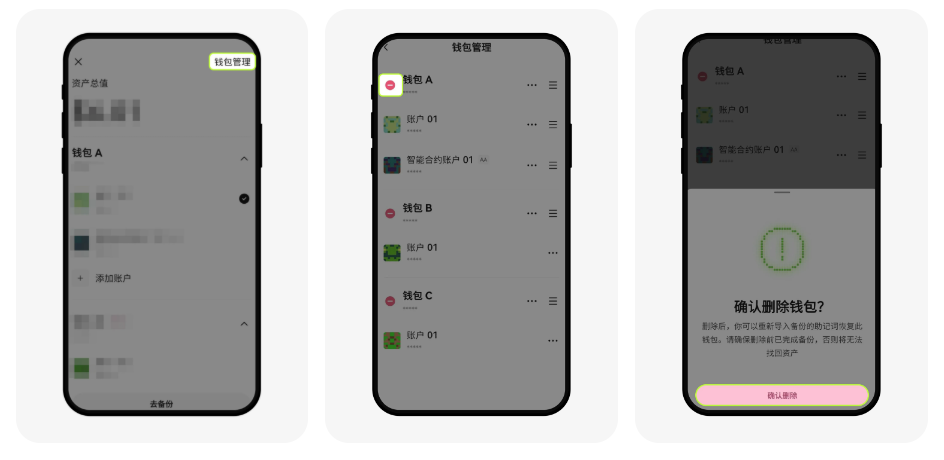
Based on the characteristics of blockchain, we cannot delete already created accounts, but we can remove them from the wallet.
OKX Wallet App Version: does not support removing specific derived accounts, such as account 01 to account 10 under wallet A; to remove wallet A - account 05, you must remove the entire wallet from the device and then re-import it using the mnemonic phrase. On the wallet homepage, click the wallet account name - [Wallet Management] - you can then click the red remove button - [Confirm Delete]. Note: After re-importing the mnemonic phrase, it defaults to restoring account 01; other accounts need to be added manually.
OKX Wallet Plugin Version: supports removing specific derived accounts. On the plugin side, click the wallet account name - [Manage Wallet] - click [ ... ] next to the account to be deleted - [Delete Account].
2. How to add an observation wallet?
On the OKX Wallet App homepage, click the downward triangle icon next to the wallet, click [Add Wallet] - [Use Observation Wallet], and enter the wallet address to add.
3. How to switch wallets/accounts?
App Version: Enter the app, click the downward triangle icon next to the wallet to switch wallets or accounts.
Web Version: Click the wallet account in the top right corner of the page - [Disconnect], then reconnect the wallet and account.
4. How to log out of the wallet?
Sorry, currently the platform does not support the wallet/account logout function.
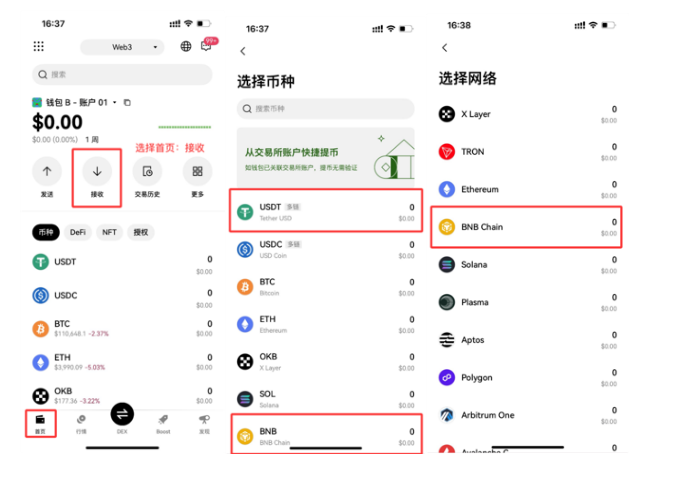
5. How to recharge to OKX Wallet?
1. Click recharge, and select BNB, USDT respectively.
2. Withdraw from other exchanges (recommended: Binance) on-chain (special reminder: choose BNB Chain).
3. 20% Reduction in Fees
Join OKX Boost through the exclusive AiCoin link to enjoy 20% discount:
https://web3.okx.com/ul/joindex?ref=AICOIN88
The invitation code is: AICOIN88
OKX Wallet
One wallet, easily store, trade, manage all your digital assets
免责声明:本文章仅代表作者个人观点,不代表本平台的立场和观点。本文章仅供信息分享,不构成对任何人的任何投资建议。用户与作者之间的任何争议,与本平台无关。如网页中刊载的文章或图片涉及侵权,请提供相关的权利证明和身份证明发送邮件到support@aicoin.com,本平台相关工作人员将会进行核查。