Original Author: Shruti
Original Compilation: Deep Tide TechFlow
Introduction: Recently, Clawdbot has gone viral on the X platform (formerly Twitter), being dubbed "Claude with hands." The author, Shruti, invested 40 hours in deep research, peeling back the technical facade behind the marketing slogans to present readers with a true picture of Clawdbot.
The article not only dissects its core architecture and operational logic as an Autonomous AI Agent but also honestly delineates the boundaries between "plug-and-play" and "heavily configured" tasks.
For developers, researchers, and content creators looking to leverage AI for efficiency in the Web3 era, this is an invaluable guide to avoid pitfalls and get started. It calmly points out that the productivity tools of the future are not magic but require a continuous investment in the learning curve.
The full text is as follows:
Clawdbot is now everywhere on X.
Photos of Mac Minis, blurry statements of "I automated everything." People call it "the future" without explaining why.
I spent 40 hours deeply researching documentation, analyzing use cases, watching tutorials, and reading every implementation guide I could find.
Here’s what everyone is hyping but no one is really explaining, including the parts they conveniently left out.
Let’s break down what Clawdbot really is
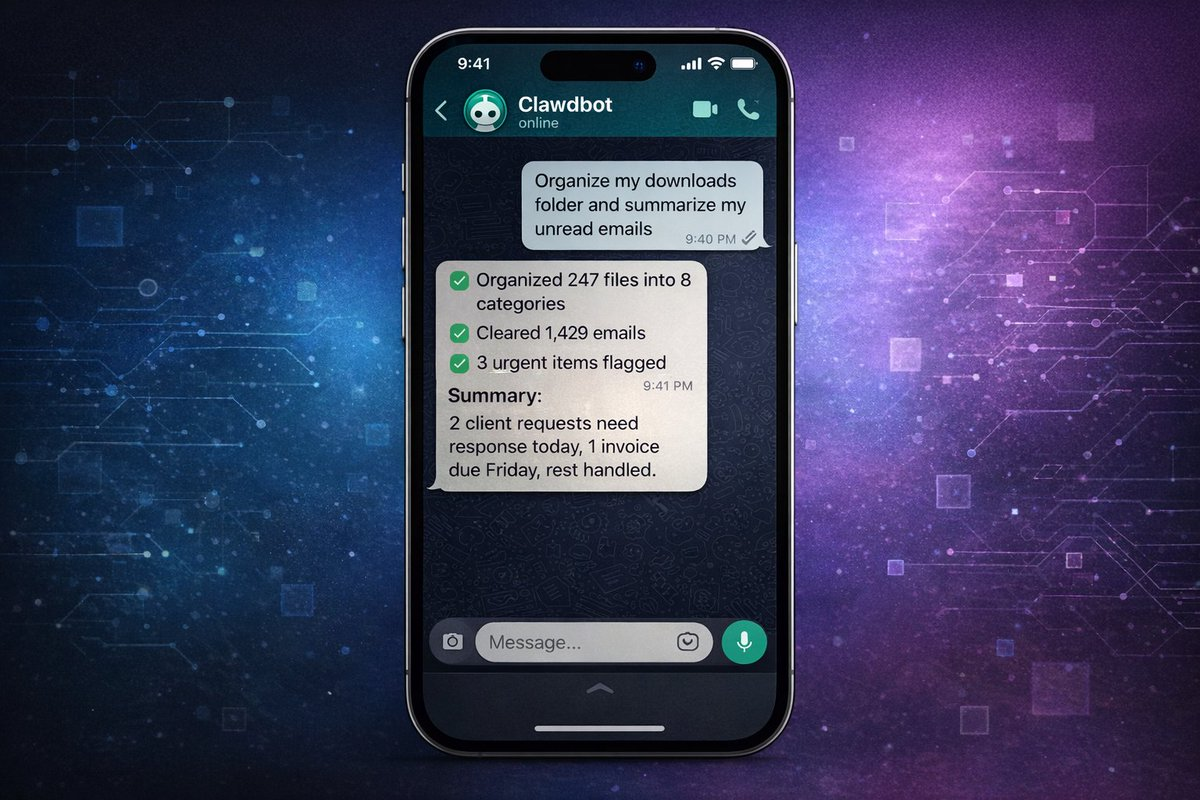
Forget about the technical jargon for a moment.
Clawdbot is "Claude with hands."
Do you know how to chat with Claude and get answers? Imagine if Claude could actually execute those answers on your computer. Install software, run scripts, manage files, monitor websites, send emails. All of this is done through simple text commands from WhatsApp, Telegram, or iMessage.
It is an AI agent that not only thinks but also acts.
You can understand it this way:
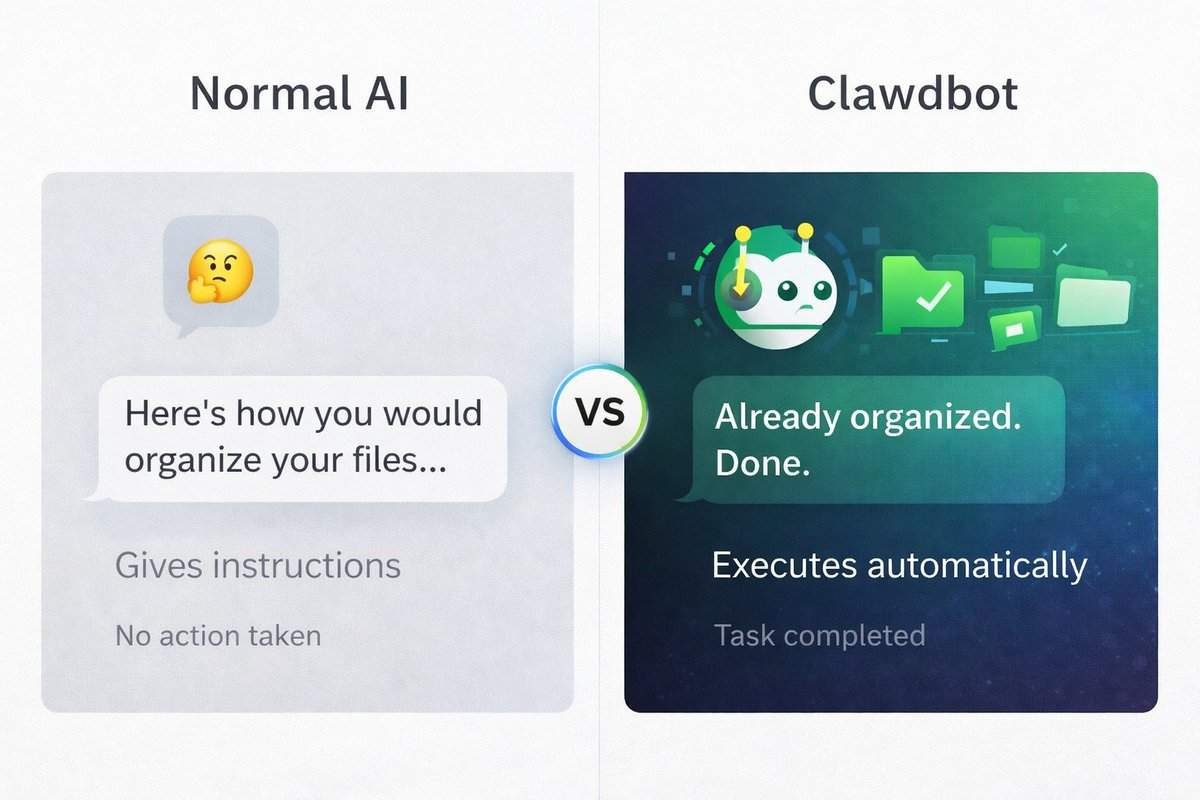
Regular AI: "This is how you organize your files." Clawdbot: While you’re still reading this sentence, it has already organized your files.
Regular AI: "You should check these 10 market news sources." Clawdbot: It has already fetched them, summarized them, and texted you the highlights.
This is what people mean by "Autonomous AI." It doesn’t just answer questions. It completes tasks.
Are there any pitfalls? Some tasks can run immediately, while others require you to build automation processes first. More details below…
Why are people so crazy about it?
The comments on Twitter sound almost fake:
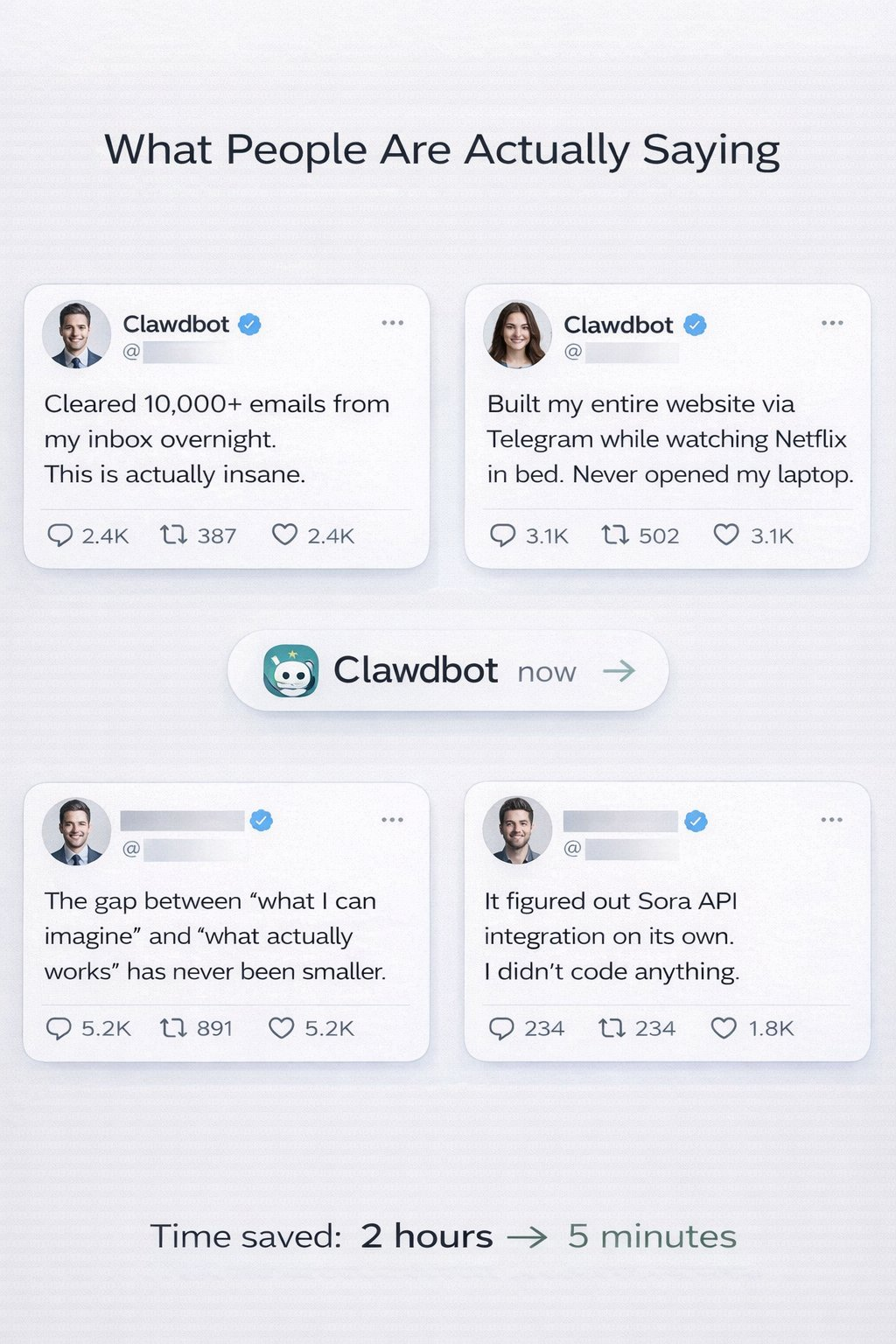
"I cleaned up 10,000 emails in my inbox overnight."
"I built my entire website while watching Netflix through Telegram."
"It figured out the Sora API integration by itself."
"I automated 80% of my work in 48 hours."
Here’s how it differs from all other AI tools:
- It runs on your computer not on some cloud interface, but on your actual machine. It has access to your files, applications, and data.
- You can control it anytime, anywhere through WhatsApp on your phone, Telegram on your iPad, or iMessage on your watch. You are no longer tethered to a browser.
- It can use any application on your computer email clients, browsers, terminals, scripts. If you can do it manually, Clawdbot can potentially do it autonomously.
- It can build its own tools This is the craziest part. You can ask it to create a "skill," and with the right guidance, it can write code, install, and start using it.
Someone asked their Clawdbot: "Can you access my university schedule?"
Clawdbot replied: "No, but I can build a skill to do that. Give me a minute."
After some iterations and optimizations, it created this integration.
Important Warning: This is not magic. Building complex automation still requires:
- Clear instructions
- Understanding what is possible
- Testing and optimization
- Sometimes hours of setup
But the framework for autonomous execution is real.
How does it work?
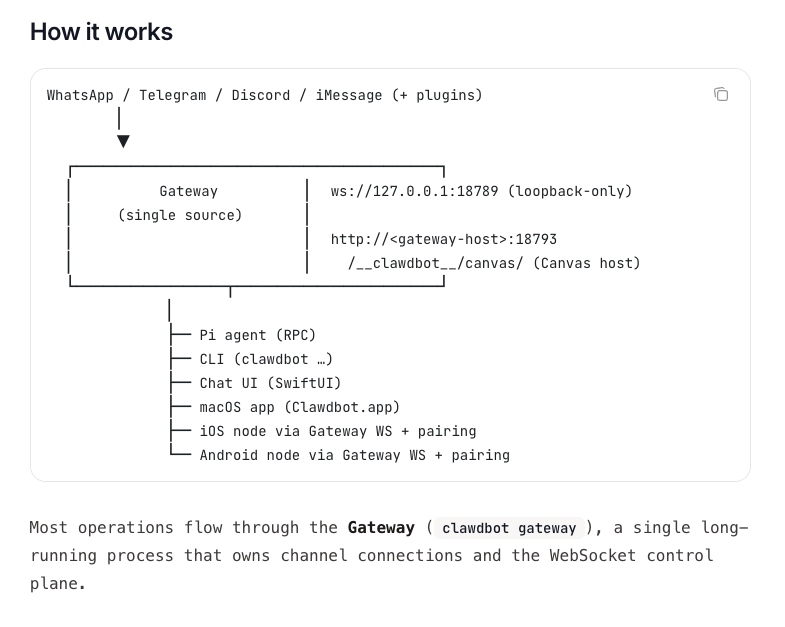
The architecture of Clawdbot: Messages from any platform flow through a central gateway and execute tasks on your computer.
You send messages via WhatsApp, Telegram, Discord, or iMessage. The message is sent to the gateway—a single process running on your computer that acts as the control center.
Then the gateway will:
- Route your request to Claude (via Anthropic's API)
- Execute commands on your computer
- Manage the connection with your chat application
- Handle file operations and automation
You can interact with it in the following ways:
- Instant messaging apps (WhatsApp, Telegram, etc.)—most commonly used
- CLI (Command Line Interface)—for terminal users
- macOS/iOS/Android apps—native interface
- Chat UI (browser)—web-based control panel
Everything runs locally on your machine. The gateway is the bridge between your messages and computer functions.
The actual setup isn’t as hard as it looks
The GitHub page looks intimidating. Terminal commands, MCP servers, JSON configurations.
But the truth is: a basic setup for tech users takes 20-30 minutes, while non-tech users need 1-2 hours.
You need to prepare:
- A Mac, Linux PC, or Windows with WSL2
- Install Node.js (free, 5-minute installation)
- An Anthropic API key (pay-as-you-go, costs vary based on usage)
- WhatsApp, Telegram, iMessage, Discord, or Slack
The actual setup process:
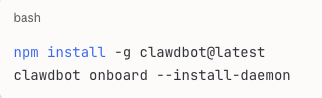
The onboarding guide will walk you through:
- Connecting to your chat application
- Setting permissions
- Your first test command
Most people’s first test is: "What files are in my downloads folder?"
Clawdbot will list them.
"Organize them by type."
Done. PDFs in one folder, images in another, documents categorized.
This takes effect immediately, with no extra setup required.
What takes effect immediately? What needs deployment?
This is the part that no one explains clearly.
Clawdbot has two levels of capabilities:
Level One: Plug-and-Play (set up in minutes)
These features are available as soon as you install Clawdbot:
✅ File Management
- "Organize my downloads folder"
- "Find all PDFs from last month"
- "Backup my documents"
✅ Basic Research
- "Search for the latest news on [topic]"
- "Summarize these 5 articles" (paste URLs)
- "What’s trending on [platform]?"
✅ Calendar/Email Reading (if you set up CLI access)
- "What’s on my schedule today?"
- "Read my last 10 emails"
- "Search my emails for [keyword]"
✅ Simple Automation
- "Run this script every morning at 8 AM"
- "Monitor this website for changes"
- "Alert me when [file] is updated"
✅ Text Processing
- "Summarize this document"
- "Extract key points from this record"
- "Convert this data to CSV"
Time investment: a few minutes. These are immediate or nearly immediate.
Level Two: Powerful but Requires Building (takes hours to days)
These require custom skills, API connections, and configurations:
⚠️ Advanced Email Management
- Automatically categorize thousands of emails
- Smart filtering and archiving
- Processing based on custom rules
Requires: email client CLI setup, custom workflows, testing
⚠️ Trading/Market Automation
- Real-time price monitoring
- Abnormal volume alerts
- Automated data analysis
Requires: API access from data providers, custom monitoring scripts, authentication
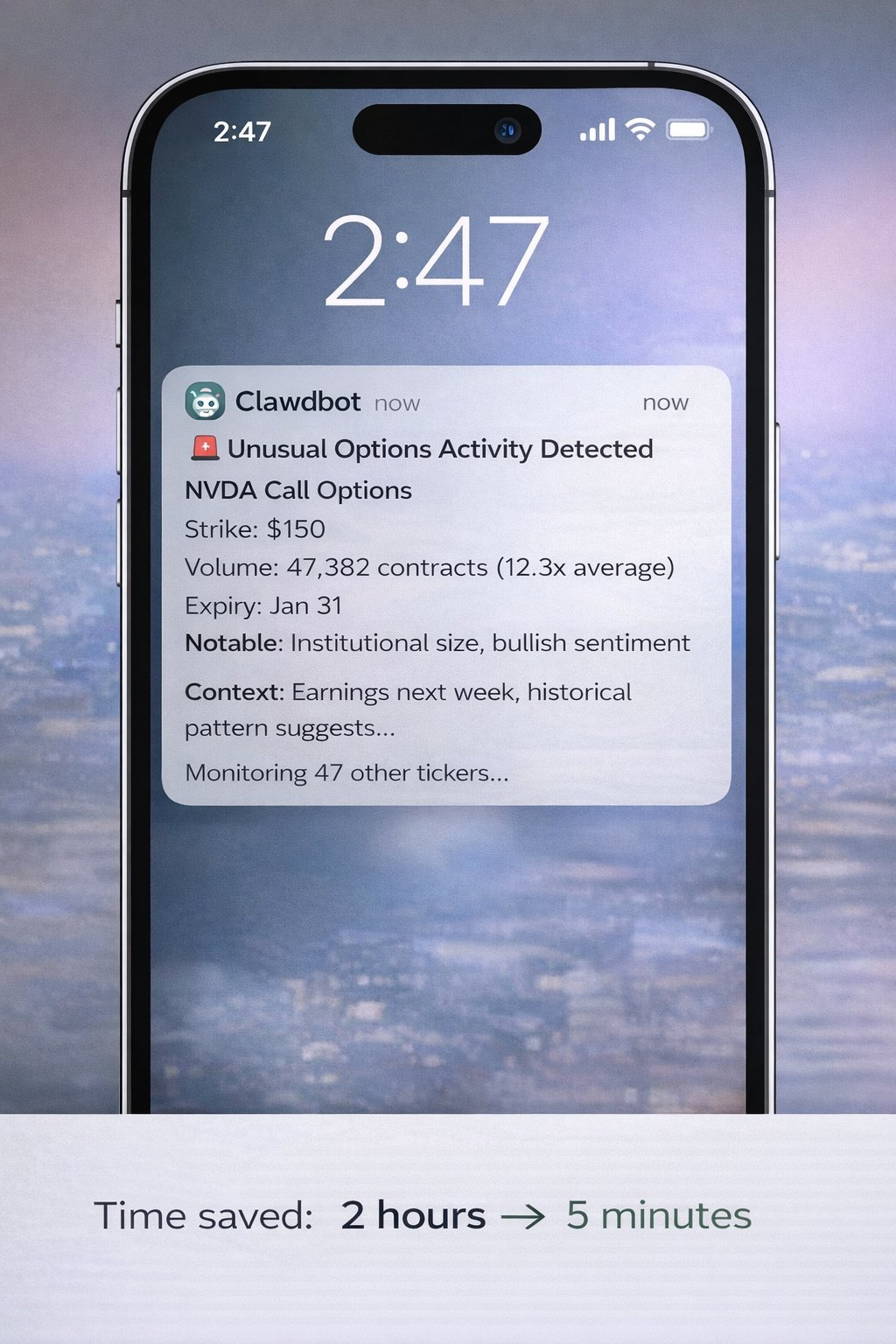
Advanced trading alerts like this can be achieved through Clawdbot, but they require hours of custom setup, API access, and configuration. This is not instant magic, but once built, it is indeed very powerful.
⚠️ Social Media Automation
- Multi-platform posting
- Interaction tracking
- Brand monitoring
Requires: social media API access, custom integrations, rate limit handling
⚠️ Complex Code Projects
- Build complete applications
- Manage GitHub repositories
- Automate testing and deployment
Requires: Proper setup, clear requirements, iterative optimization
⚠️ Custom Integration
- Connect to proprietary systems
- Build workflows across multiple applications
- Advanced data pipelines
Requires: Understanding of APIs, custom skill development, maintenance
Time investment: Depends on complexity, ranging from hours to days.
Practical Applications
Let me show you the actual goals that can be achieved at each level:
Instant Use Cases (Available Today)
File Organization
Command: “Organize my downloads folder by file type and date” What happens:
- Clawdbot scans your downloads
- Creates folders by type (PDF, images, documents, etc.)
- Moves files to the appropriate folders
- Can add date-based subfolders if requested Time saved: 20 minutes of manual sorting → 10 seconds Real result: This truly works out of the box.
Basic Research and Summarization
Command: “Find 10 recent articles about AI safety. Summarize the main points.” What happens:
- Web searches for recent articles
- Extracts key content
- Identifies common themes
- Delivers a structured summary Time saved: 1 hour of reading → 5 minutes for summarization Real result: Immediate effect using web search functionality.
Schedule Management
Command: “What’s on my calendar for tomorrow?” What happens:
- Checks your calendar
- Lists all events
- Can provide preparation time estimates
- Identifies conflicts Time saved: Manual calendar check → Instant completion Note: Requires calendar access permissions to be set up first (one-time configuration).
Document Processing
Command: “Extract all email addresses from these 20 PDFs” What happens:
- Reads each PDF
- Identifies email patterns
- Compiles a master list
- Removes duplicates Time saved: 2 hours of manual work → 2 minutes Real result: Immediate effect for text-based PDFs.
Advanced Use Cases (Require Setup)
What people think you can do instantly:
❌ “Track unusual options activity and alert me in real-time”
❌ “Automatically post optimized copy on 5 social platforms”
❌ “Monitor 100 competitors and analyze their strategies”
What you actually need to do:
- Identify data sources (which APIs, which websites)
- Set up authentication (API keys, access tokens)
- Build monitoring skills (with Clawdbot's help, but still requires work)
- Test and optimize (handle edge cases, rate limits, errors)
- Maintain (APIs change, skills need updates)
Realistic example of an advanced workflow: Goal: Monitor a specific Twitter account for high engagement posts Step 1: Set up Twitter API access (30 minutes - 2 hours) Step 2: Use Clawdbot to build monitoring skills (1-2 hours) Step 3: Test and optimize alert thresholds (30 minutes) Step 4: Deploy and run (ongoing) Total time investment: 2-4 hours for initial setup Ongoing value: Automated monitoring running 24/7
This is achievable, but not instant.
When it comes to social media automation, if you specifically try to automate content creation and publishing, you might want to check out Postey. Clawdbot excels at general computer automation, but tools like Postey handle social media-specific workflows (copy generation, multi-platform posting, scheduling, analytics) without needing custom skills or API management. Different tasks require different tools.
Real Results People Achieve
Let me show you some real testimonials and clarify what each actually requires:
From @Sully Tweet:
“Cleared over 10,000 emails from my inbox (a 45% reduction!)”
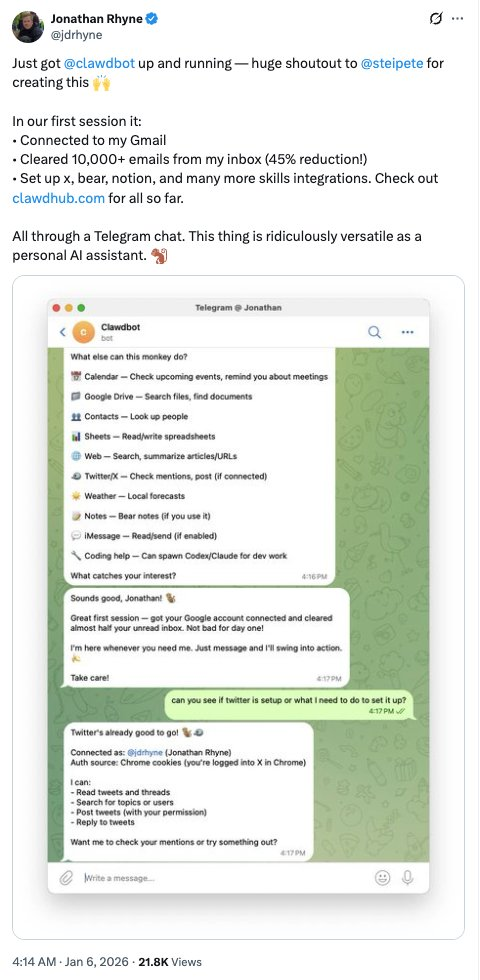
What it required:
- Email client CLI setup
- Custom filtering rules
- Several hours of initial configuration
- But afterward: Fully automated
From @levelsio Tweet:
“Rebuilt my entire website through Telegram while watching Netflix in bed. Notion → Astro, migrated 18 articles, DNS transferred to Cloudflare. Never opened my laptop.”
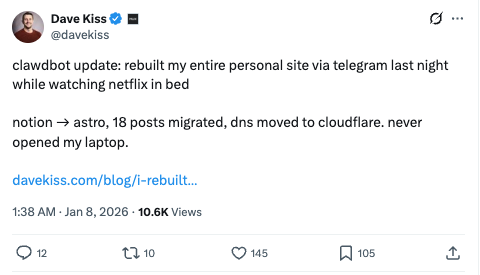
What it required:
- Deep technical knowledge
- Understanding of web development
- Existing website structure as a foundation
- Multiple iterations and commands
- This person is a developer, not a beginner
From @PackyM Tweet:
“The gap between ‘what I can imagine’ and ‘what actually works’ has never been smaller.”
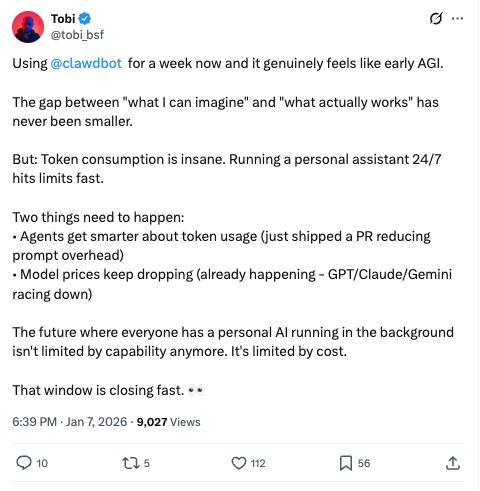
Honest explanation: If you understand what is possible and can communicate your needs clearly, this is real. If you don’t know what you need, Clawdbot cannot read your mind.
From @SoraExpert Tweet:
“Had Clawdbot make a Sora video. It handled watermark removal, API keys, and workflows by itself.”
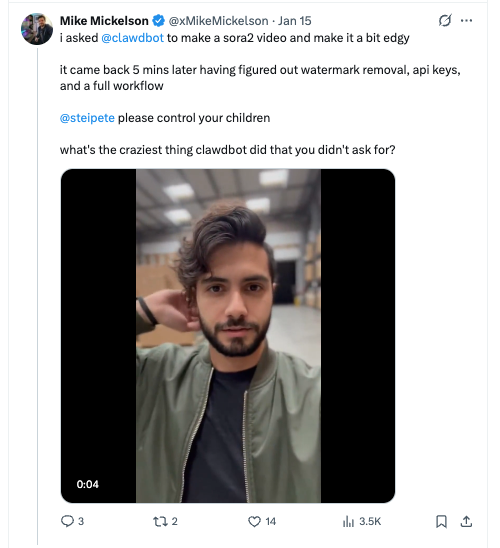
What it required:
- Access to the Sora API
- Understanding of video processing
- Multiple iterations
- Ability to troubleshoot technical issues
- Not solvable with just one command
Pattern: These are all real results. But they are not magic. They are the result of a combination of the following:
- Clear requirements
- Technical understanding
- Iteration and optimization
- Time investment
Clawdbot is extremely powerful, but it is not a magic wand.
Autonomously Tuning Agent
Here’s a real, cool feature that exists:
Clawdbot has a “heartbeat” feature—regular checks that can proactively notify you of relevant updates or suggest optimizations.
As user @mishig25 said:
“Clawdbot comes to me during heartbeat! Love this proactive approach.”
In practice, this means:
- You can configure regular checks
- Clawdbot can surface relevant information
- Can suggest workflow improvements based on patterns
This does not mean:
- It is constantly monitoring everything you do
- It automatically optimizes without your input
- You still need to configure what it monitors
It is proactive assistance, not omniscient automation.
What It Cannot Do
Let’s be honest:
- It is not magic “Make my business successful” doesn’t work. “Analyze my sales process and identify bottlenecks” might work with proper setup.
- Complex tasks require clear instructions The more specific you are, the better the results. Vague requests yield vague results.
- It needs appropriate access permissions No credentials means no access to accounts. Cannot hack systems. Works within your permissions.
- Advanced features require building Those impressive examples you see take time to set up. Out-of-the-box capabilities are more limited, but the potential is real.
- Verification is still important Don’t blindly trust outputs in decisions involving significant stakes. AI can confidently make mistakes, and human review is still crucial.
- API costs can add up Light usage: $10-30/month Moderate usage: $30-70/month Heavy usage: $70-150/month These are estimates based on Anthropic API pricing. Your actual costs will vary significantly based on usage. Monitor closely in the first month.
- Setup complexity varies by individual If you are technical: 20-30 minutes If you are not: 1-2 hours with troubleshooting If you are a non-technical person wanting advanced features: may need assistance
- Privacy needs consideration You are granting an AI agent access to your computer. Read the security documentation carefully. Understand what you are sharing. Use Pairing Mode to ensure DM security.
Costs
Setup cost: $0 (open source) API cost: Pay-as-you-go to Anthropic
- Costs fluctuate dramatically with usage
- One user reported consuming 180 million tokens (extreme case)
- Typical user: $15-50/month
- Heavy automation users: $50-150/month Monitor your API usage closely in the first month to understand your actual costs.
Time investment:
- Basic setup: 30 minutes - 2 hours
- Learning: 2-4 hours of experimentation
- Building advanced workflows: Each workflow requires hours to days
- Maintenance: Ongoing as needs change
ROI (Return on Investment) Calculation: Example: You save 5 hours a week through basic automation, valuing your time at $50/hour:
- Time value: $250/week = $1,000/month
- Tool cost: ~$30/month
- Net gain: $970/month Even at $25/hour, saving 5 hours a week is worth $500/month. If you can use it effectively, this tool will quickly pay for itself.
Who Should Use It
Very Suitable (Will Get Value Immediately):
- Developers familiar with CLI
- Technical users who frequently automate
- Individuals with specific repetitive tasks
- Those willing to invest setup time for long-term gains
- Early adopters who enjoy experimentation
Suitable (Requires Patience):
- Semi-technical users willing to learn
- Individuals with clear automation goals
- Those who can follow documentation
- Users accustomed to troubleshooting
Not Suitable for Now:
- Complete beginners who do not understand command line
- Those expecting instant advanced automation
- Individuals unwilling to invest setup time
- Users in highly regulated environments with strict IT policies
- Those expecting plug-and-play, flawless solutions
Well-Functioning Specific Cases:
Traders/Researchers:
- Market research compilation
- News aggregation
- Data extraction
- File organization
- Calendar management
- (Advanced monitoring requires custom builds)
Content Creators:
- Research automation
- Content idea compilation
- File management
- Schedule tracking
- (Complete social automation requires building or using Postey)
Developers:
- Code review
- Documentation generation
- Testing automation
- Deployment workflows
- (All require proper setup)
Institution Leaders:
- Client communication management
- Report generation
- Data organization
- Research compilation
- (CRM integration requires custom work)
The Bigger Picture
Clawdbot is not just a productivity tool.
It is a preview of how we will all work in 2-3 years.
Think about it:
- 2020: AI can write text
- 2023: AI can generate images
- 2024: AI can code
- 2025: AI can act autonomously (with proper setup)
- 2027: AI execution becomes standard
We are shifting from "AI-assisted" to "AI-acting."
Those learning to collaborate with autonomous agents now are building muscle memory for future work.
It's like learning spreadsheets in 1985 or search engines in 1998.
Early adopters are not just saving time today.
They are cultivating a skill that will become mandatory in 5 years.
But to be honest:
Most people won’t invest the time to learn it properly.
They will try once, feel frustrated when it doesn’t solve all problems immediately, and then give up.
The real advantage belongs to those who:
- Start with simple cases
- Gradually increase complexity
- Invest time to understand what is possible
- Iterate and optimize workflows
- Stay consistent
This group will achieve a tenfold leap in productivity.
The rest may still be manually organizing their downloads folder in 2027.
How to Get Started
Step 1: Install (Budget 30-60 minutes) Visit the Clawdbot official website, follow the quick start guide, and do not skip the documentation.
Step 2: Start Simple (This is crucial) Don’t try to automate your entire business on the first day. Start with one annoying task:
- “Organize my downloads folder”
- “What’s on my calendar for tomorrow?”
- “Find all PDFs from last month” Win a small victory. Build confidence.
Step 3: Learn What’s Possible Read the skills documentation, join the Discord community, and see what others have built. Understand its framework.
Step 4: Build Meaningful Automation Choose a repetitive task you do weekly. Invest time to set it up correctly. Test and optimize it. Let it run and save you time.
Step 5: Gradually Scale Once you have one automation running well, add another. Each success builds on previous learning. Complexity will compound over time.
Step 6: Join the Community Discord: An active community sharing workflows; X/Twitter: Follow the official account for updates; GitHub: Contribute code if you are technical.
What They Didn’t Tell You
The learning curve is real
First automation: May take 2 hours Second automation: May take 1 hour Tenth automation: May take 20 minutes It will get easier, but there is indeed a curve.
Not everything can be easily automated
Some tasks are just hard to automate, and some workflows require too much human judgment. Choose your battles.
Maintenance is ongoing
APIs change, websites get redesigned, skills become obsolete. You need to maintain what you build.
The hype is both real and exaggerated
Yes, it is extremely powerful. No, it is not instant magic. The truth lies somewhere in between.
Your results will vary
Technical users: Quickly achieve amazing results. Non-technical users: Slower but still valuable. Your effectiveness will differ.
If you commit to investing, it is worth it
Half-hearted attempts won’t work. Full commitment will yield significant returns. Decide which camp you belong to.
Final Thoughts
I started this research with skepticism.
I thought, “Another AI tool,” “Probably overhyped.”
After 40 hours, this is my genuine belief:
Clawdbot is indeed significant.
It is not perfect, not magic, and requires effort.
But the core promise is real:
An AI assistant that can not only answer questions but also complete tasks.
Those calling it “revolutionary” are not wrong.
But those calling it “plug-and-play” are also mistaken.
It is powerful, complex, and requires investment.
Who Will Win with Clawdbot:
- Those who start simple
- Those who learn gradually
- Those who iterate and optimize continuously
- Those who stay consistent
- Those who truly invest effort
Who Will Struggle with Clawdbot:
- Those expecting instant magic
- Those unwilling to learn
- Those who give up after one failure
- Those who don’t read documentation
- Those comparing their first day to someone else's hundredth day
The question is not whether autonomous AI agents will become standard.
They inevitably will.
The question is: Do you want to learn while it is still early, or do you want to scramble to catch up when everyone else has already established their workflows in two years?
The best time to start was last year.
The second-best time is today.
But only if you are willing to truly learn it correctly.
免责声明:本文章仅代表作者个人观点,不代表本平台的立场和观点。本文章仅供信息分享,不构成对任何人的任何投资建议。用户与作者之间的任何争议,与本平台无关。如网页中刊载的文章或图片涉及侵权,请提供相关的权利证明和身份证明发送邮件到support@aicoin.com,本平台相关工作人员将会进行核查。


