Author: BruceBlue
Risk Warning: I am not a licensed financial advisor. This article is based on public information and risk statements, and does not constitute a profit promise or personalized investment advice. On-chain Mint, order placement, authorization, transactions, and tape-outs may have irreversible consequences; please only use funds and wallet permissions that you can afford to lose entirely for testing.
The vast majority of people entering Tapeout for the first time will first check the price, look at the market, and ask which "chip" is worth Minting.
I suggest the opposite.
First, see if it can do something, then decide if you want to own its component. Because Tapeout can easily be misunderstood as a more complex trading page; its truly different part is that you can connect NAND and LATCH into logic, run it in the browser, and then tape out the components into an on-chain circuit.
This article is not about advising you which asset to rush into. It only provides you with a minimal, verifiable, and least risky path: first understand the processor, then try Mint or the order book on a very small scale, and finally run through a minimal circuit.
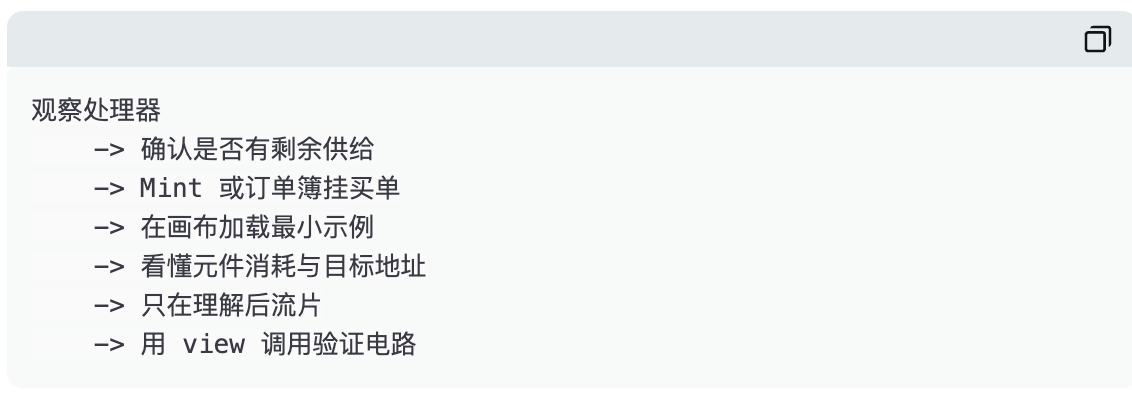
1. Preparation: Do not start an on-chain experiment class with your main wallet
Enter https://tapeout.net/ in your mobile wallet and switch to the BNB Smart Chain mainnet. Keep a small amount of $BNB in the wallet for gas; if you want to Mint or place buy orders, you will need additional $BNB to cover the Mint amount or escrow amount displayed on the page.
Do not interpret "connect wallet" as a consequence-free action. The connection itself generally does not transfer funds, but subsequent Mint, order placement, authorization, sales, and tape-outs all require different types of signatures. More importantly, the official website currently clearly discloses that the protocol is in an upgradable phase, and plans to seal in the future; therefore, any statement that is long-term immutable and absolutely requires no trust should not replace your own verification.
For first-time use, it is recommended to create a separate experimental wallet with only a very small amount of $BNB. A truly mature way to participate is not to sign a lot at once, but to first confirm that you can explain what each signature actually changes.
2. Step One: Choose the processor first, do not look for the one with the highest increase first
The basic unit of Tapeout is not a globally unified token. Each processor has its own component supply and circuit ecosystem; users can Mint NAND or LATCH under that processor and use the corresponding components for canvas and tape-out.
The processor detail page usually displays the name, creator, total component quantity, minted quantity, number of Mint addresses, number of holders, created circuits, and Mint controls. When entering for the first time, read these fields first, then touch "connect wallet."
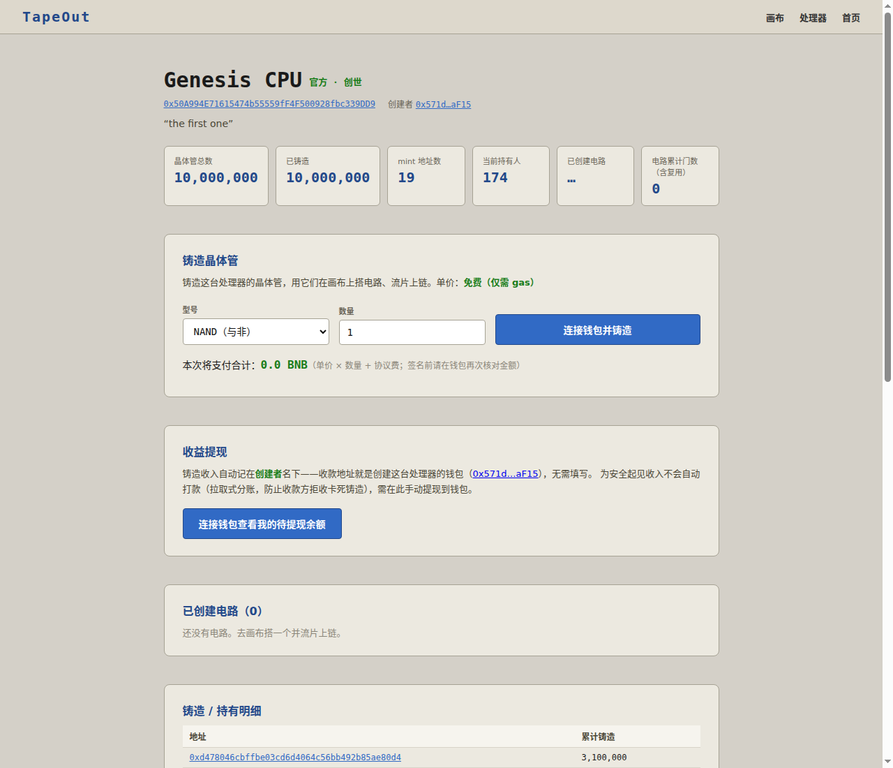
Figure 1 | Snapshot of Genesis CPU detail page, accessed on 2026-08-17 (GMT+8). This is an example of a fully minted processor; the interface displaying the Mint control does not indicate that there is still Minting capacity.
This screenshot is especially worth seeing clearly. The Genesis CPU shows both total quantity and minted quantity as 10,000,000 at this time; therefore, whether the button is still visible does not serve as evidence of whether you can Mint. The real criteria for judgment should be: what is the total supply, how much has been minted, are you choosing NAND or LATCH, what is the unit price and total payment amount, and does the processor really have something you want to do.
"Official," "Genesis," and "Free" are not safety labels. They are at most attributes and not disclaimers of risk.
3. Step Two: When there is remaining supply, the correct way to Mint is "small, slow, and verifiable"
If the processor you choose still has Mintable supply, the detail page will let you select NAND or LATCH and then enter the quantity. The official website explains that the Mint unit price for individual processors is set at creation; some may be 0 $BNB, that is, "free Mint, only gas is incurred," but this is not a universal rule for all processors and all times.
The first Mint does not require any complex strategies. Just follow the order below:
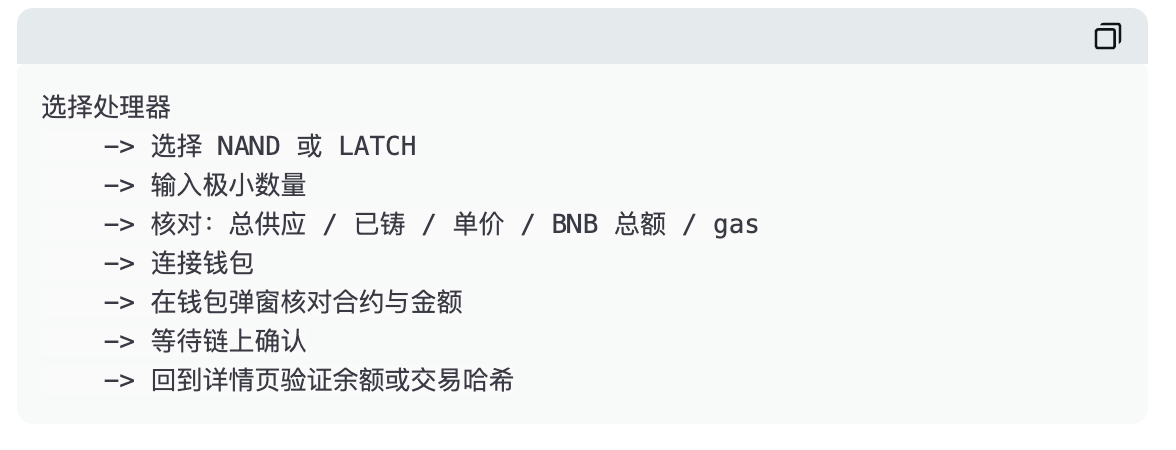
The meaning of Mint is not "buying Tapeout." What you obtain is a certain type of component under a certain processor. This determines where it can be traded, what type of tape-out it can be used for, and whether you subsequently have the necessary NAND/LATCH combination to complete a certain circuit.
If you do not understand why the processor needs two types of components, it does not prevent you from learning first. But this is why you should only Mint the minimum quantity, rather than mistake a single transaction as a bet on the entire project.
4. Step Three: When fully minted, the market is an order book, not a one-click buy button
If the processor is fully minted, the official website offers a separate market segmented by "processor × NAND / LATCH." Buyers input the unit price and quantity they are willing to pay, $BNB enters escrow according to page logic; sellers select an existing buy order and sell by inputting a quantity not exceeding their remaining amount. The official market page indicates that a 1% fee is charged for transactions and reminds that first-time sales will first authorize the market contract.
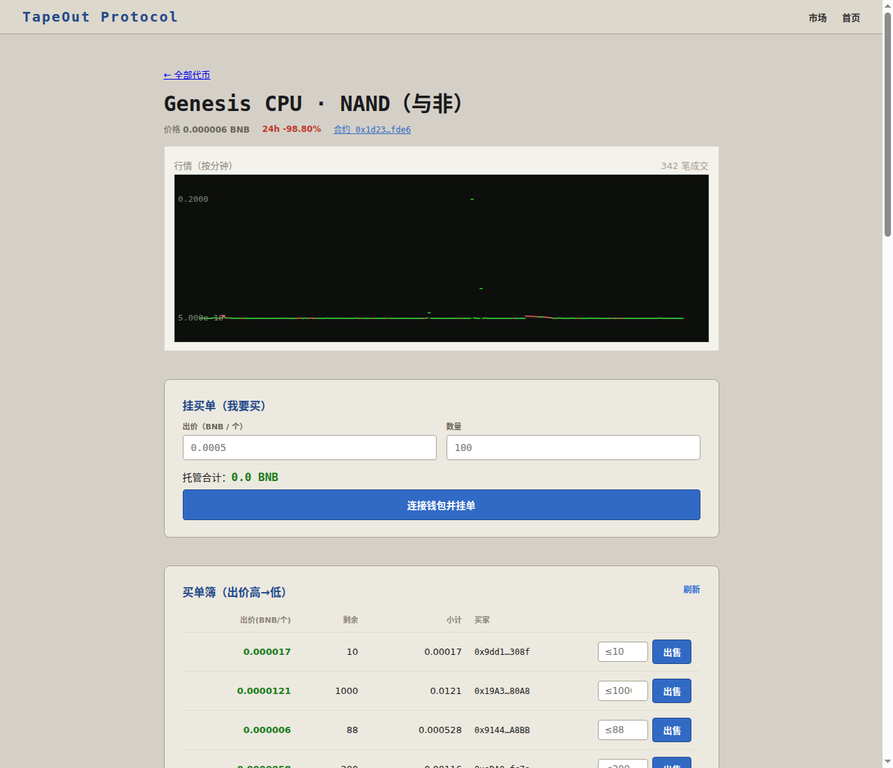
Figure 2 | Snapshot of the market order book interface, accessed on 2026-08-17 (GMT+8). The prices, 24-hour changes, order volume, and transaction counts shown in the figure are dynamic data snapshots and do not constitute executable prices or profit hints.
The most common mistake here is to interpret the most prominent "latest price" on the screen as a price you can execute immediately. In early, low-depth, fragmented markets, a very small transaction can create exaggerated fluctuations; what really determines whether you can execute is the price, remaining quantity, and escrow status of a specific buy order in the order book.
Operation | What happens on the page | What you need to confirm |
Place buy order | Input BNB unit price and quantity, page calculates total escrow | Is the total escrow BNB within range; how will funds be handled if the order is not executed |
Sell to buy order | Input a quantity not exceeding the balance for the selected buy order | Remaining quantity of buy order, total transaction amount, and 1% fee |
First sale | Wallet requests authorization for market contract | Is the authorization target the officially open market contract; is the limit too large |
Transaction confirmation | Wallet returns the transaction hash, waiting for on-chain confirmation | Verify status on the block explorer, not just rely on front-end prompts |
If you do not understand the order book, do not place an order. If you do not understand the total amount, do not sign. On-chain trading is not an exam, and it is not necessary to rush to respond.
5. Step Four: To truly "play" Tapeout is to make a minimal circuit in the canvas
Enter https://tapeout.net/#canvas. The canvas provides input/output pins, constants, NAND, LATCH, and examples such as 4-bit addition, 8-bit addition, 8-bit multiplication, and 4-bit CPU. The right side will display the number of gates on this layer, timing units, netlist bytes, and the number of components required for tape-out.
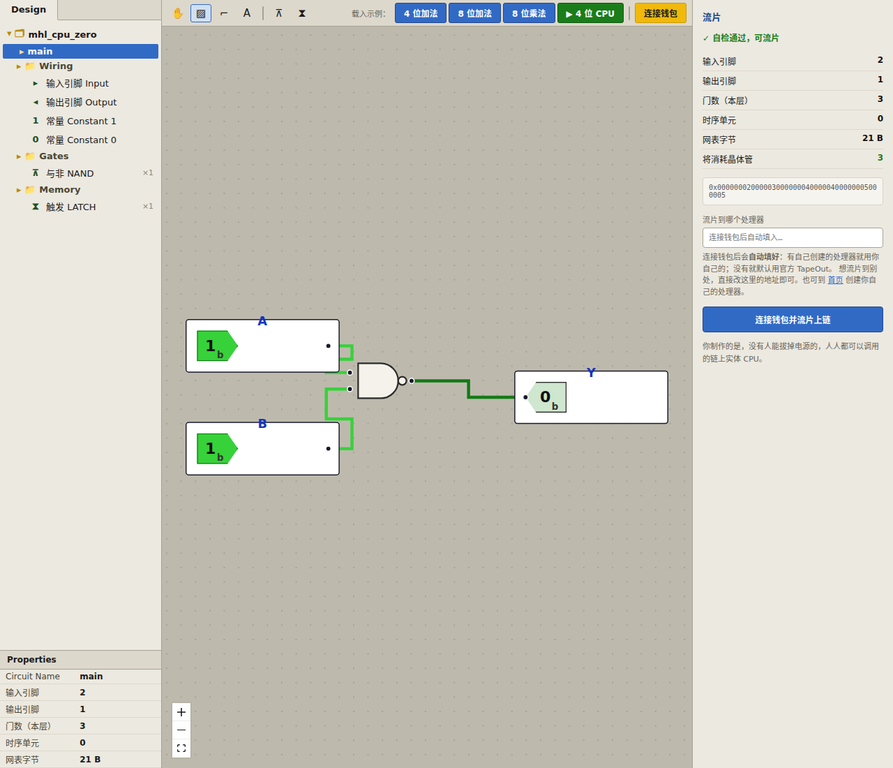
Figure 3 | Snapshot of the official website canvas, accessed on 2026-08-17 (GMT+8). The right side shows self-check, component consumption, netlist, and target processor address input, which must be verified item by item before tape-out.
For your first attempt, do not start drawing from zero. Choose the smallest example and first observe how the inputs and outputs change. At this time, you do not need a wallet and do not need to purchase any components; just understand: how inputs enter NAND, how outputs are computed, and why the right side shows "transistors will be consumed."
When you are ready to tape out, it is time for real on-chain action. The official website states that tape-out will consume the corresponding components and generate a circuit; after connecting the wallet, if you have created a processor yourself, the target processor address will be automatically filled in with your own processor; otherwise, it will default to the official TapeOut, and users can manually overwrite it.
This means that before the tape-out, you must clarify at least the following four statements:
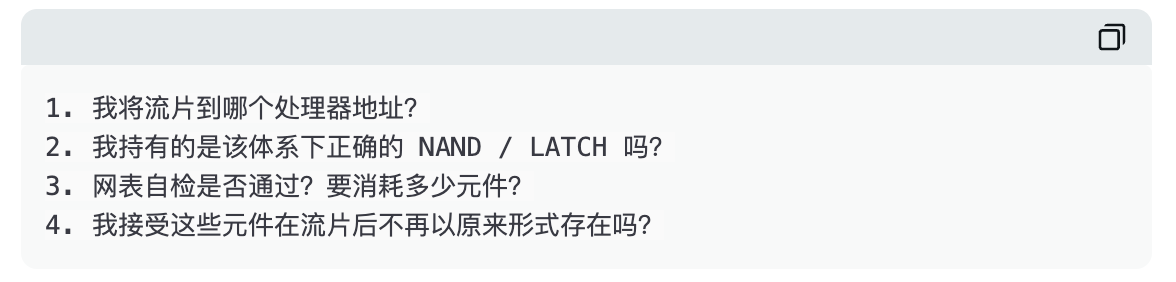
Tape-out is not "saving a draft." It is a transaction that will change the state of your assets. The correct way to start is to only do the smallest example and only consume the fewest components.
6. Step Five: After the tape-out, do not just look at the NFT number; try to invoke it
The official processor details page of Tapeout describes the circuit as an on-chain function that can be read for free. Combinational logic can be queried through eval(circuitId, bytes), and circuits with timing units can be called using step; the official website also provides examples of BscScan Read Contract, command line, and ethers.js.
So the complete closed loop should not be:

But should be more like:
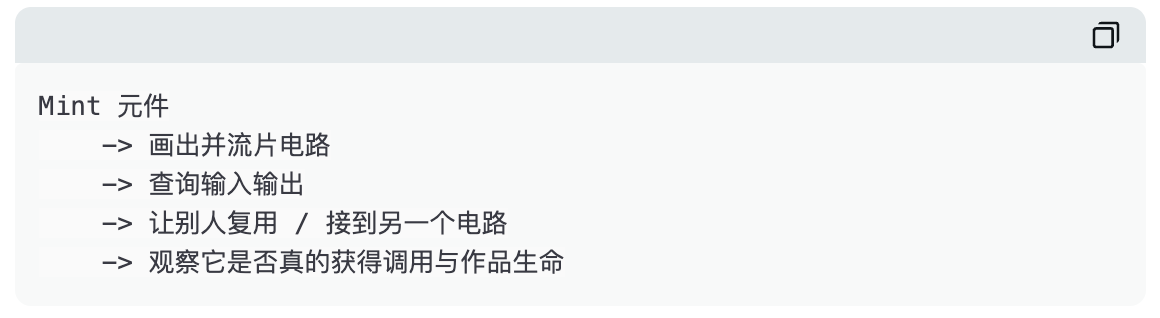
Even if you do not write code, you can first use the Read Contract of BscScan. It is a read-only query, does not require sending transactions, and usually does not require wallet connection. Do not enter Write Contract without understanding the function’s meaning, and do not directly copy the contract address from some external tutorial into the wallet confirmation page.
7. Do not misinterpret the "on-chain BTC miner" demonstration
The Tapeout official website also has a page titled “Real on-chain BTC miner based on TapeOut manufacturing.” Its public description clearly states: the real-time SHA 256d calculation stream runs locally on the backend; the on-chain part is an independently verifiable single-round SHA-256 circuit, which can be invoked 64 times to reproduce the standard SHA-256 result for free in the browser.
This is a very visually appealing demonstration of "verifiable logic," but it is not an entry point for ordinary users to earn Bitcoin mining revenue. Do not make any transfers to this page, and do not assume you are participating in mining because the page displays hash power, block height, and leading zeros.
The project party separates "real-time execution" from "on-chain verifiable," which is the most respectful aspect of this page. When looking at on-chain projects, being able to clearly state boundaries is more difficult and more valuable than saying everything is on-chain.
8. The last ten seconds: Before signing each time, ask yourself once
Question | Only if you answer clearly, is it worth continuing |
Am I on the official website? | I entered tapeout.net manually, not redirected by strange private messages or advertisements. |
Am I on the correct network? | BNB Smart Chain mainnet. |
What am I signing? | Mint, place buy order, authorize, sell, or tape out; their consequences are entirely different. |
How much am I paying or putting in escrow? | I have looked at the total BNB amount in the wallet, gas, and any escrow amounts. |
What is the target contract? | I have cross-verified from the official website and the block explorer, not just looking at truncated addresses. |
Can it be revoked? | Minting, transactions, and tape-outs usually cannot; tape-outs will also consume components. |
If everything goes to zero, can I accept it? | If not, it indicates that the amount, permissions, or actions are not suitable for me now. |
If you have completed the minimal path in this article and genuinely understand the closed loop of "component—tape-out—circuit—invoke," you are already closer to Tapeout than the vast majority who only look at K-lines.
Whether to continue participating is your own choice. At least do not turn an interesting on-chain logic class into a tuition fee paid because you did not clearly see the pop-up.
免责声明:本文章仅代表作者个人观点,不代表本平台的立场和观点。本文章仅供信息分享,不构成对任何人的任何投资建议。用户与作者之间的任何争议,与本平台无关。如网页中刊载的文章或图片涉及侵权,请提供相关的权利证明和身份证明发送邮件到support@aicoin.com,本平台相关工作人员将会进行核查。


