Author|Dong Daoli
WeChat|ddl941110
After a long wait, Qwen4-Max-Preview has finally been released. With the official launch of the preview version, a mystery has also been unveiled. A few days ago, Qoder released an anonymous model called "Qoduck," which is actually Qwen4-Max-Preview.

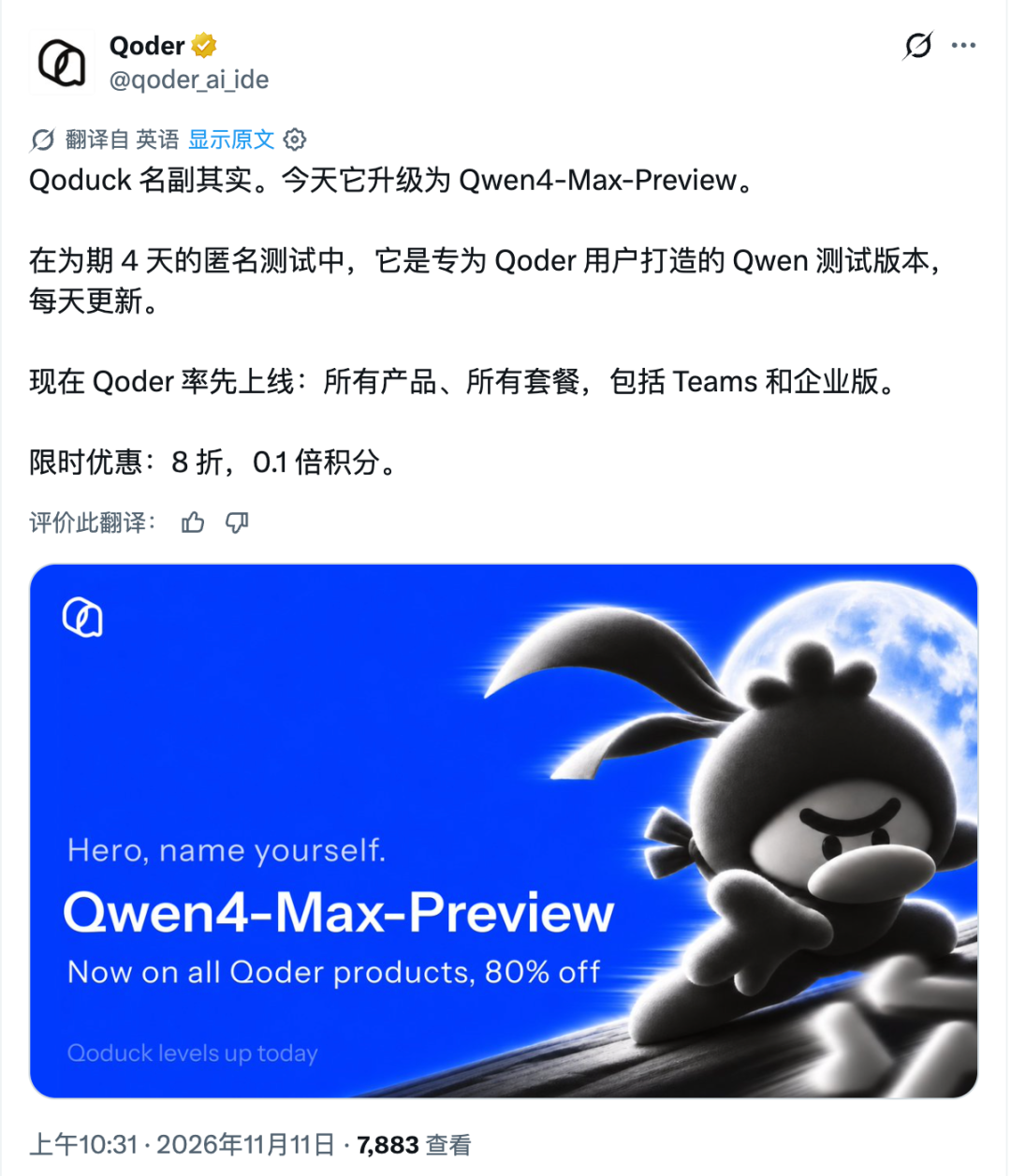
Qwen has not disclosed specific parameters, benchmark performance, or training data. It only mentioned in the official announcement that this generation has strengthened the underlying world knowledge and multimodal perception, as well as improved coding and agentic capabilities.
Based on previous reports, Qwen4 has made changes to the underlying model architecture, and the exact changes brought by this new architecture may require more information.
However, the release time of Qwen4 is certainly noteworthy; models have been clustered together in recent days, with Anthropic just releasing Claude Fable 5.2 and Google’s Gemini 4 Carbon also being simultaneously unveiled.
Choosing to launch at this crucial moment, Qwen4 clearly intends to directly challenge the cutting-edge flagship models in Silicon Valley.
But whether the model is truly useful will have to be tested with some demos and projects.
We first replicated several works that have recently circulated online, testing in Qoder CN with Qwen4-Max-Preview using the "high" setting.
1
Test One: A Pelican Riding a Bicycle
The pelican riding a bicycle is a classic test; from initially being poorly produced to now, almost every model can produce decent results.
prompts: Generate an animated SVG of a pelican riding a bicycleWhat Qwen4-Max-Preview produced was a pelican wearing a red hat, riding along the seaside. The wheels turned, the scarf fluttered behind, and there was indeed the ability to pause, adjust pedal speed, and switch between day and night. Adjusting the speed to 1.75 times and exporting the SVG, opening it alone, would still animate without internet.
1
Test Two: Drawing a Picture with Code
Prompts
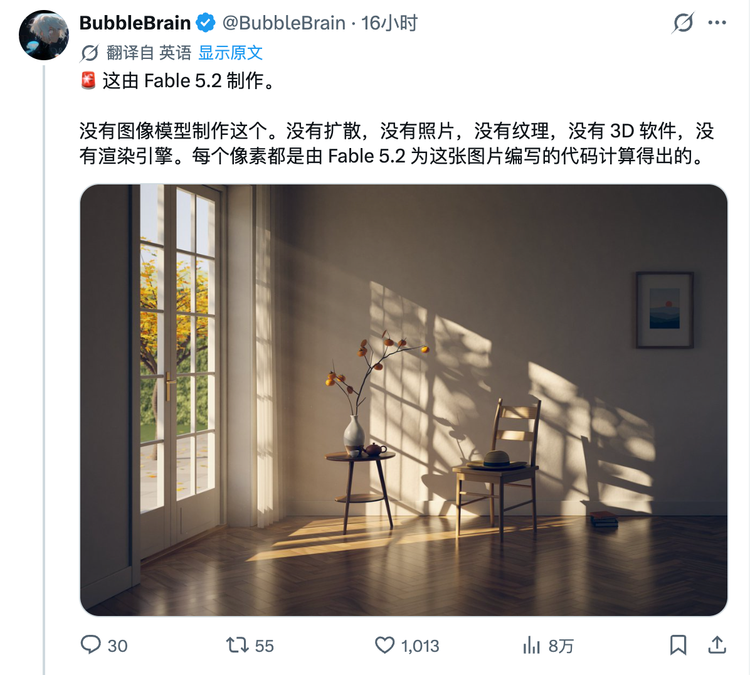
Using any coding technique you know, draw a picture with interplaying light and shadow, highlighting the serene light and shadow atmosphere of the afternoon. Pursue perfection and excellence.After the release of Fable 5.2, user BubbleBrain shared an image depicting an afternoon room. The shadows from the window pane swept across the walls, chairs, and patterned wooden floors, looking like a real photograph taken in this room. According to the publisher, Fable5.2 created this image using pure code, with a C++ built path tracer that rendered for three hours, showcasing its remarkable coding capabilities.
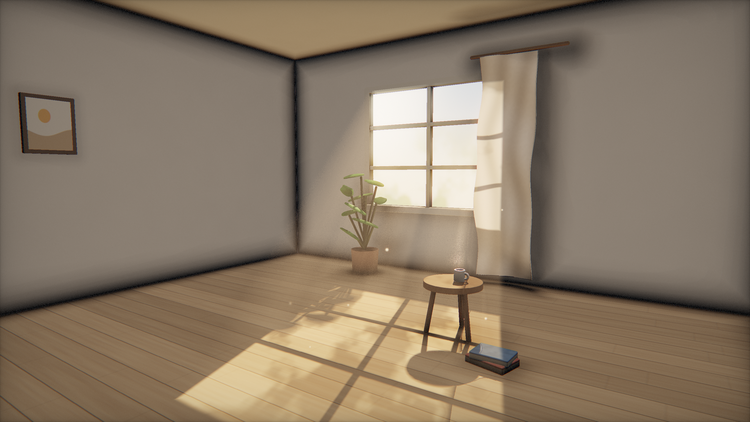
I used the same prompts to ask Qwen4-Max-Preview to create one as well.
Qwen4-Max-Preview chose a different route, building a room using WebGL and rendering another version with CPU. The light coming in diagonally from the window looks quite nice, spreading over a small round stool, down to the bottom edge of the image. However, the harsh black lines in the corners and the potted plant and floor look like newly set scenery.
The two images show that Fable's image transitions more naturally from the bright side by the window to the darker side inside. At least in pure coding ability, Qwen4-Max-Preview is still far from the forefront.
The next one was generated by GPT-6 Astra Ultra in Codex, and its effect is clearly better than that of Qwen4-Max-Preview.
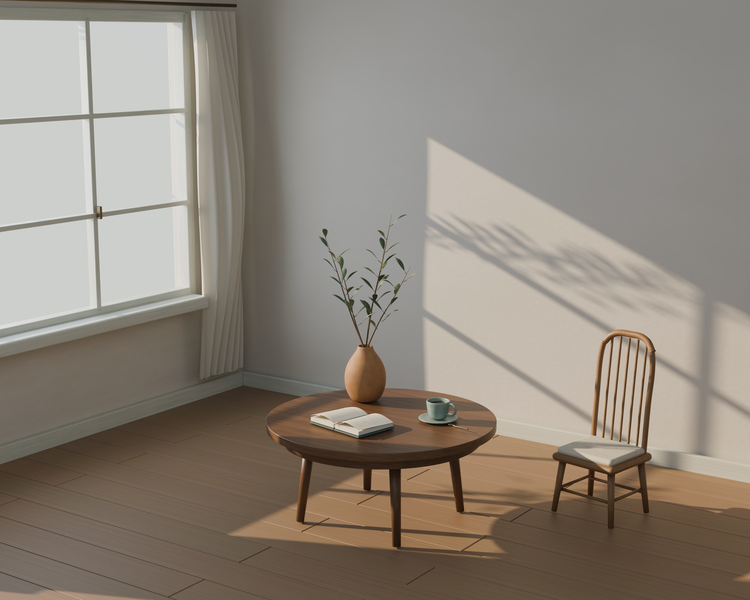
1
Test Three: A Paper Plane Flying Over Floating Islands
Next, we tried a mini-game generated by Fable 5.2. Gamejam supplied the same prompt to both Fable 5.1 and 5.2.
Prompts
Make a 3D game with three.js. One index.html file I can open in my browser. You fly a paper plane through a sky of floating islands and fly through glowing rings for points. Arrow keys to steer. 60 seconds, score in the corner. Make it fun and nice to look at.The prompt required using Three.js to create a mini-game, all within a single HTML file that could be opened in a browser. Players control the paper plane with arrow keys, navigate through glowing rings between floating islands to score points in a time limit of 60 seconds.
Let’s look at the "Paper Skies" made by Fable 5.1 and Fable 5.2.
From the video results, Qwen4-Max-Preview essentially matched the level of Fable 5.1. From takeoff and scoring through rings to the countdown ending, a round can be played completely. Fable 5.2's advantage lies in its ability to independently think and refine game rhythm; as floating islands draw near, there are added details, and different colored reward rings can still be recognized from afar, allowing for extra points if targeting the bullseye.
Next, we will conduct two types of tests that we frequently perform. One involving modeling in Blender, the other making a 3D scene into an interactive webpage. We will use the prompts given previously to Kimi K3.1 Pro to see if Qwen4-Max-Preview's aesthetic capabilities can keep pace with K3.1.
1
Test Four: 3D Modeling | The Giant Ship Maintenance Dock in Orbit of Jupiter
Prompts:
Please directly use the local Blender, to create an original three-dimensional scene with a cinematic feel: "The Giant Ship Maintenance Dock in Orbit of Jupiter." This is a multi-model parallel test. Please actually complete modeling, materials, lights, camera, rendering, and project saving, do not just stay on plans, tutorials, or code demonstrations. Please autonomously decide on unspecified design details, and continue until delivery is completed. If the environment truly cannot run Blender, please clearly state the actual barriers and do not describe unexecuted scripts as completed works.
1. Parallel testing isolates the local Blender executable: /Applications/Blender.app/Contents/MacOS/Blender unified testing root directory: /Users/ddl/Documents/Codex/2026-10-24/wo Start by automatically generating a unique task ID, using time stamps plus random identifiers, do not just use easily repeatable names like A, B, test, etc., nor do you need to ask users. Create independent directories belonging to this task at the following locations: Intermediate files: testing root > /work/blender-benchmark/taskID > / Final delivery: testing root > /outputs/blender-benchmark/taskID > /. Isolation rules: use a separate background Blender process you initiated, complete the work through Python and command line. Use --background and --factory-startup when initially creating the scene. Do not connect any shared MCP services, do not manipulate any currently opened Blender windows. Use task-independent user configurations and temporary directories, achieve this through subprocess-level configurations, and do not modify the system or user's global environment. Rendering, baking, simulation caching, and logs must be explicitly written into this task directory. Do not modify Blender global preferences, installation directory, public plugins, or system-level dependencies. Prioritize using Blender's built-in capabilities. Only manage processes you initiated, record their PID. Do not use killall, bulk-end processes by name, or similar methods to clean up tasks. Do not read, reference, modify, or overwrite scripts, projects, and results from other test tasks. Consulting Blender's official documentation is not restricted. Except for the shared render lock specified below, only write files to this task's exclusive directory.
2. Shared rendering resources for modeling and scripting can be parallel. Actual rendering, baking, and high-load physical simulations must queue. All tasks share the following lock directory: testing root > /work/blender-benchmark/render.lock Obtain locks by atomically creating a directory, do not use the "check for nonexistence first, then create" non-atomic method. Locks should record task ID, holding process PID, and start time inside the lock. Only after successfully acquiring a lock can rendering, baking, or high-load simulations begin. Wait if the lock is occupied; do not preempt, delete others' locks, or terminate others' processes. When tasks end or exceptions occur, reliably release locks held by yourself. Do not hold rendering locks during modeling, scripting, or normal file processing. If locks seem abnormal and cannot reliably confirm ownership and process status, please report the situation while retaining the completed project, and do not clear it arbitrarily.
3. Scene setting A giant starship, about one and a half kilometers long, docks in a semi-open circular dry dock, which is about three kilometers in diameter. The enormous Jupiter occupies the background, with sunlight illuminating the hull from the side and behind. The starship has experienced a long voyage accident and is undergoing maintenance. The rear armor has been removed, exposing engine components, support frameworks, lines, and inspection platforms inside. Several robotic arms extend toward the ship's body, and small maintenance boats are distributed around the dock. The foreground features a maintenance bridge, including railings, equipment boxes, and two workers in spacesuits. Through the scaling between people, portholes, maintenance boats, starships, docks, and planets, the audience can sense the volume. The aforementioned dimensions are used to establish scale relationships; there is no requirement to create meaningless geometric burdens for unobservable areas.
4. Styling requirements The starship needs a clear, distinctive overall silhouette. The bow, living quarter section, cargo section, and engine section should feature different structural characteristics and should be reasonably connected to form a whole. Avoid making the main body a simple cylinder, then decorating the surface with random small cubes. The dry dock needs to include the main load-bearing framework, circular structure, inspection platform, connecting passageways, and at least three robotic arms. Robotic arms should have bases, joints, arm segments, and end tools, with clear connection relationships. Underneath the removed armor, there should be real internal geometry, including supports, equipment, and pipelines. It cannot just use glowing planes or textures to replace the internal structure. Concentrate details on spaces capable of explaining function, such as armor seams, heat sinks, hatches, docking interfaces, maintenance facilities, and pipeline anchoring points. Use basic geometry, curves, modifiers, geometric nodes, and instancing as allowed. Appropriate variations should occur between repeated modules while maintaining a consistent overall design language. The main body should be self-modeled, do not download pre-made spaceships, docks, or complete scenes. Programmable materials are allowed, but do not use generated images to replace the main geometry or background structures.
5. Visual requirements Overall, maintain a restrained industrial sci-fi style, primarily in bone white, deep gray, and metallic colors, with small amounts of orange for maintenance equipment and warning areas. The main shot looks out from the foreground maintenance bridge, complemented by the starship silhouette, dock structure, and Jupiter background. The image should have a clear visual center, occlusion relationships, and layers of depth. The grandeur should be established based on scale, composition, structural density, and spatial depth. The main subject's silhouette should be clear, avoiding having all areas filled with the same density of details. Use directional lighting. Allow appropriate atmospheric effects, but the main structure must be discernible; it should not be obscured by overly dark exposures, heavy fogs, intense glare, or excessive depth of field.
6. Execution process First, build the overall gray model, check scale, main silhouette, and spatial relationships, then refine structure, material, and details. First, output a low-resolution preview, actually open and check the rendered image, verify if the main subject is visible, if exposure is normal, if structures are clear, and if there are significant interpenetrations or floating issues. Allow up to two rounds of visual corrections based on the preview results. Any program running errors can be repaired separately; please truthfully document them, and do not count failed renderings as effective previews. Once completed, output the final image. This round will focus on static scenes, without making animations or expanding complex physical simulations. After saving the final project, reopen it through a separate background process to check if the models, materials, cameras, and necessary resources are intact. Do not let the delivery files depend on soon-to-be-deleted temporary files.
7. Final delivery Save the following to this task's final delivery directory:
1. An editable .blend project.
2. Complete generation scripts and necessary support files. Paths should be as parameterized as possible and specify how to reproduce them.
3. One 1920×1080 main perspective render.
4. Two renders of the main subject observed from different angles, with at least one showing a side not sufficiently displayed in the main shot.
5. A close-up of the engine's internal structure or the robotic arms in gray model, using neutral materials and clear lighting for easy inspection of the real geometry.
6. A short README.md documenting the task ID, actual Blender version, rendering engine, main production methods, reproduction commands, and unfinished or unverified parts. Organize collections and objects by function using meaningful names. Retain the possibility of subsequent localized edits, do not irreversibly merge the entire scene into one object just for exporting results. Once completed, display the main perspective and key close-ups in the reply, providing the absolute paths to the final files.
Qwen4-Max-Preview work:
Kimi K3.1 Pro work:
This question can be viewed in two parts; in terms of modeling capability, Qwen4-Max-Preview excels, but in terms of aesthetic ability, or model attractiveness, K3.1 Pro is better.
The modeling ability of Qwen4-Max-Preview is evident in the tail of the ship. When the camera zooms in and the materials are turned off, the curved ribs, central beams, and internal reactors and pipelines can be distinctly identified. Looking from afar, the circular living modules, rows of cargo containers, and four trumpet-shaped nozzles all have their own profiles. Meanwhile, K3.1 Pro’s cargo bay has used several repeated modules, where the structure is not so detailed from the shell to the interior of the engine room.
In appearance, Kimi's ship has a rectangular hull paired with neatly arranged cargo holds, giving it a regular sense of industrial equipment, with the orange joints of the robotic arms standing out prominently. The spaceship produced by Qwen4-Max-Preview somewhat resembles a piece made from steel pipes connected together.
1
Test Five: 3D Webpage | The Gate of the Tide
Prompts:
Please directly create an independent HTML file in the current directory named "The Gate of the Tide.html." Create an interactive three-dimensional visual work with cinematic concept design quality, themed "The Gate of the Tide: The Giant Ring Sea City After the Tide Retreats." All HTML, CSS, JavaScript, and shader code should be inlined, run offline, without external images, fonts, models, or libraries. Technologies such as native WebGL, GLSL, Canvas, etc., can be used, and the main scene needs to possess realistic three-dimensional perspective and spatial relationships. Prioritize achieving good composition, architectural outlines, light and shadow, and materials before adding auxiliary features. Upon opening the page, it should present a complete and most expressive scene immediately, suitable for directly capturing a 16:9 image.
[World and Visual Center]
The scene is a stepped sea city built in a great bay. The city's center is a giant circular sluice gate spanning across the bay. It features a heavy stone structure, segmented copper sluice gates, connecting bridges, and recognizable architectural scales. The giant ring extends from one mountain to the other, with some structures submerged in the sea. Within the ring are layers of sunken central squares; outside the ring is the open sea surface. The giant ring is the visual center of the image, but a complete world must exist around it: shorelines, ports, city areas, navigation channels, distant mountains, and the sky. Through small boats, windows, railings, and silhouettes of people, the audience can comprehend the enormous scale of the architecture. The overall visual scale reaches several kilometers.
[First Screen Composition]
Use a slightly elevated oblique side view over the sea surface to avoid a standard top-down sand table view. Foreground: a corner of the image shows basalt, copper railings, or damaged stone steps close to the lens, with clear edges, forming a spatial entrance. The foreground can only occupy a small area and cannot obscure the subject. Midground: the giant ring, layered city, and central square comprise the main information. The building rises in layers from the water's surface to the mountains, with varying densities, retaining gaps formed by squares, waterways, and bridge arches. Background: the bay exit, distant mountains, snow peaks, and cloud layers gradually reduce contrast, forming clear atmospheric perspective. The curved shoreline, bridges, and waterways guide the view toward the center of the giant ring. The main subject's outline must be clear, avoiding all buildings being of the same height and shape.
[Architectural Language]
Use basalt, light weathered stone, oxidized copper, and a small amount of dark metal. The city must feature at least four recognizable architectural forms: coastal stepped residences. Tall, slender lighthouse towers. Bridges and embankments with continuous arches. Public buildings arranged around the central square. Nearground buildings have door and window recesses, rooftop levels, colonnades, or railings; midground retains complete outlines; background simplifies details. Buildings must have clear footing and support relationships. Bridges must connect real existing roads or platforms, while staircases link accessible areas of different heights.
[Water Surface and Tides]
The sea should employ deep turquoise and cool blue, with visible waves, highlighters, and color variations in the shallower areas along the shore. Reflections on the water surface can be approximated reasonably but need to correspond with the sky, light sources, and main building placements. The tide slider controls the unified water level of the entire bay. At high tide: most of the stone steps and low-lying roads of the central square are submerged, and the interior of the giant ring is primarily underwater, with boats floating at the corresponding water levels. At low tide: circular stone steps, ancient roads, shallow pools, and square patterns gradually emerge. Moist stones appear along the shore with deep water lines. Changes in water levels should update shorelines, boat heights, exposed areas, and related reflections. It cannot just move a transparent blue plane while leaving other objects unchanged.
[Lighting and Materials]
By default, employ the "Golden Low Tide" state: warm-colored evening sunlight shines from the side and back of the image; the edges of the giant ring are illuminated while the backs of buildings remain cool-colored. The water surface forms directional golden reflective bands, and the stone steps cast clear long shadows. There need to be significant differences between materials: basalt is rough and heavy. Light-colored stones should exhibit soft diffuse reflections. Oxidized copper is generally dark, with only local metallic highlights. Wet stone steps reflect more strongly than dry stones. Water surface highlights vary with waves and viewing angles. Glare should be restrained. After turning off glare, architectural levels, materials, and lighting relationships still hold true.
[Theme Adaptation]
Provide two complete environment themes: "Golden Low Tide": warm-colored sunset, cold turquoise sea, clear long shadows, city details visible. The control interface should adopt gentle light stone colors, dark text, and minimal copper highlights. "Blue Tide Rising": the sun has already set, and the sky and sea enter deep blue; some city windows, lighthouses, and bridge surfaces are lit up. Lighting should distribute along real buildings, and reflections should appear on the water surface. The control interface should synchronously use a dark blue-gray background color. Theme switching links the sky, main light, ambient light, building lighting, mist, and interface coloring. During theme switching, retain the current tide level, lens, and pause state.
[Interaction and Interface]
Support limited range panorama and zoom, restricting penetration into mountains or the water surface. Provide three preset angles: bay panoramic view. Central square close-up. The waterway perspective through the giant ring. Provide tide levels, sun direction, play/pause, lens reset, and theme switching. Lens switching should be smooth, and user actions can interrupt automatic movements. Interfaces should fit the sea city theme, resembling a simple nautical observation tool. The subject occupies the vast majority of the scene, with the control area defaulting to compact, detailed parameters expandable. Provide a screenshot mode for hiding the interface. On smaller screens, control items should be folded into the bottom panel, keeping the city subject visible.
[Acceptance Key Points]
The initial screen should present a clear visual center, foreground, middle ground, background, and complete light and shadow without requiring operation. After pausing, it should still be a complete composition. Lower the tide level, exposing layers of the central square and road, while synchronously changing boats and shorelines. Change the sun direction, and the projections and water reflections of the giant ring should change accordingly. After switching themes, city lighting, sky, waterbody, and interfaces should update together. Observing from different angles, bridge arches, circular sluice gates, and stepped city areas maintain correct spatial relationships. Please complete the actual running file and briefly explain the approximations used for water surface reflections, shadows, and tides.
Qwen4-Max-Preview:

Kimi K3.1 Pro:

This test of the 3D webpage further solidified my positioning of Qwen4-Max-Preview's capabilities, which excel in coding and 3D ability compared to K3.1 Pro, while K3.1 Pro has better aesthetics.
Qwen4-Max-Preview connected the sluice gate to the tide slider as well. During low tide, the stone steps gradually emerge, and the sluice gate rises correspondingly. During high tide, the sluice gate falls, with the reflections in the water shaking along with the ripples, and the structure is very stable.
But speaking of aesthetics, just look at that giant ring. K3.1 Pro's sluice gate within its giant ring and the buildings on both sides can still be distinguished, and the gray-green tone unifies the entire city. Qwen4-Max-Preview's giant ring looks rough, almost like stone pillars with a bit of color. Furthermore, in terms of the overall tone and atmosphere of the scene, K3.1 Pro feels designed, while Qwen4-Max-Preview appears simply rendered to finish the task.
1
Test Six: Revamping the Silicon Star Official Website Again
Remember last time when we had three models (glm5.2, k3, Qwen3.8 max) take on Silicon Star's official website together? Qwen3.8-Max-Preview scored first across six tests.
This time we tasked Qwen4-Max-Preview with redesigning the homepage hero. The requirement is that upon opening the homepage on both desktop and mobile, users should be able to directly click on the headlines and quick news, and the viewpoints, videos, and events below should also connect seamlessly.
In the first round, Qwen replaced the brand animation with a newspaper-style front page. On desktop, the left side presented the headline with a cover and introduction, while the right side had five quick news items. On mobile, the quick news were listed below the cover, and users could access the report immediately from the first screen. During self-testing, it found that the cover request failure would leave broken images, so it added a placeholder image to the homepage. We blocked the cover request recheck, and both headlines on desktop and mobile could still be clicked.
After reviewing the first version, we provided two detailed feedback points. Shorten the mobile cover a little so the first three quick news can avoid the AI floating button in the lower right corner. Leave the date in the headline, and remove the real-time clock and the "THE NOW" from the top right corner of the quick news bar. Qwen finished the revision in about 5 minutes.
Based on these two rounds for the official website changes, I am very willing to continue assigning similar modifications to Qwen4-Max-Preview. It quickly understands the needs and executes accurately. We wanted readers to be able to access the reports immediately upon entry, and it moved the headlines and quick news to the first screen. Later, we pointed out that the third quick news and the AI floating button were crowded together, and it shortened the mobile cover, allowing the first three quick news to avoid the floating button.
Overall, I believe Qwen4-Max-Preview has undoubtedly reached the level of flagship models; tasks like modifying the website are a strong suit for Qwen4-Max-Preview. Whether dealing with complex codes or more detailed modifications, Qwen4-Max-Preview can complete them at a reasonable speed.
In terms of 3D modeling and webpage 3D ability, Qwen4-Max-Preview is slightly stronger than Kimi K3.1 Pro. After the model spaceship's armor was stripped away, the ribs, beams, and internal pipelines could be distinctly identified. The structure of the sea city is also more clearly linked. However, in aesthetics, it still cannot match Kimi K3.1 Pro.
There is still quite a gap between it and the cutting-edge model Fable5.2, whether it is in coding ability or aesthetics, it feels generationally different. However, on certain aspects, Qwen4-Max-Preview is comparable to Fable 5.1, as seen in the paper plane game test, where the finished product equaled that of Fable 5.1.
At present, it seems that domestic models will need a little more time to catch up with Fable 5.2 and GPT-6 Astra. But from another perspective, most of the tasks we usually write code, modify websites, and create interactive prototypes for do not actually require the model to handcraft a path tracing renderer from scratch using C++. In these day-to-day tasks that truly need to be done, the current domestic flagship models are already fully sufficient.
免责声明:本文章仅代表作者个人观点,不代表本平台的立场和观点。本文章仅供信息分享,不构成对任何人的任何投资建议。用户与作者之间的任何争议,与本平台无关。如网页中刊载的文章或图片涉及侵权,请提供相关的权利证明和身份证明发送邮件到support@aicoin.com,本平台相关工作人员将会进行核查。


