
Author: Omnitools
The AI transfer station is transforming from a niche tool into a wider model entry point. For many users, its appeal is straightforward: lower prices, more models, unified interfaces, and the ability to integrate development tools like Claude Code, Codex, and Cursor.
However, the issues with the transfer station arise here. Users think they are just switching to a cheaper API address, but what they might actually be handing over could be prompts, code, business documents, customer data, call logs, or even the development context of entire projects.
Omnitools believes that discussions about AI transfer stations should not be limited to "is it usable" or "which is the cheapest." The more important question is: where does the demand behind the transfer station come from? Do users really need it? If it must be used, how should risks be controlled?
1. Market Demand Behind the Transfer Station
An obvious conclusion is that the transfer station's popularity is due to real demand.
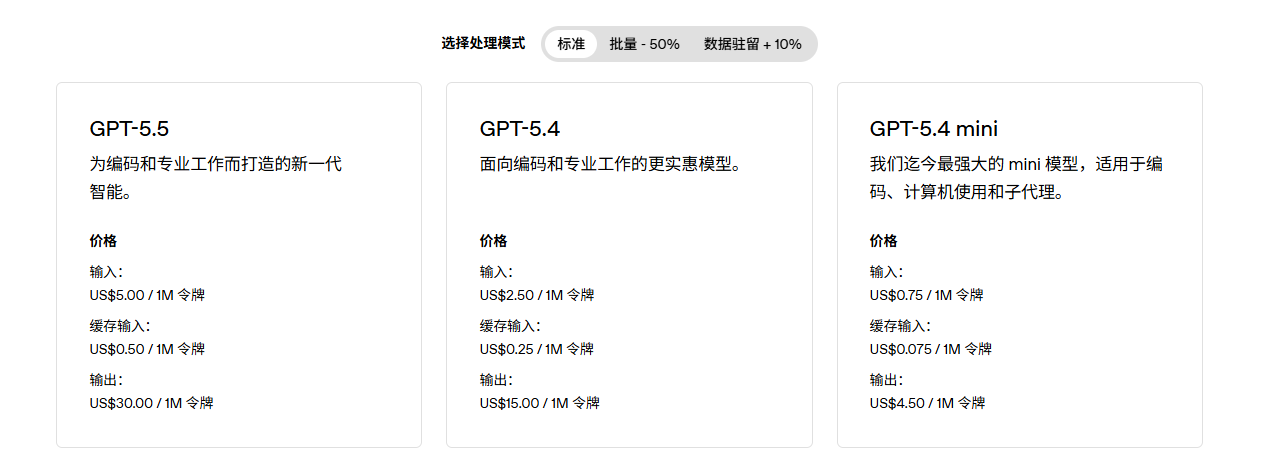
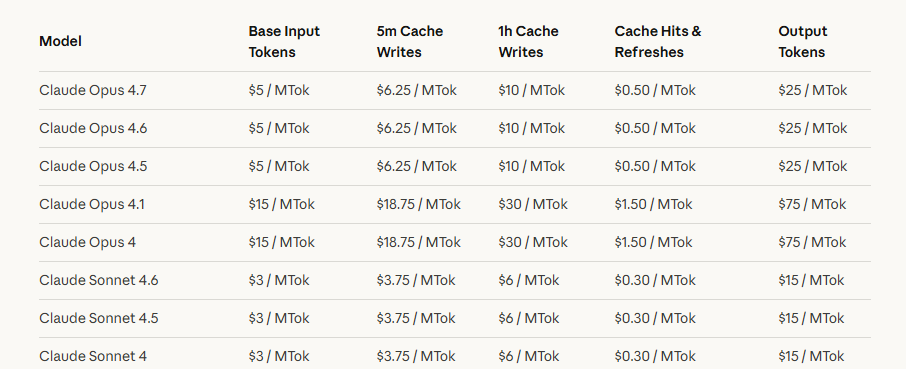
First is the price advantage; the official APIs of leading overseas models are not cheap. The OpenAI pricing page shows that the input price for GPT-5.5 is $5 per million tokens, and the output price is $30 per million tokens; the Anthropic pricing page shows that Claude Sonnet 4.7 has an input price of $5 per million tokens and an output price of $25 per million tokens. For general chatting, these costs are not noticeable, but for long text processing, code generation, multi-turn agent tasks, and automated workflows, the calling costs can quickly become perceptible.
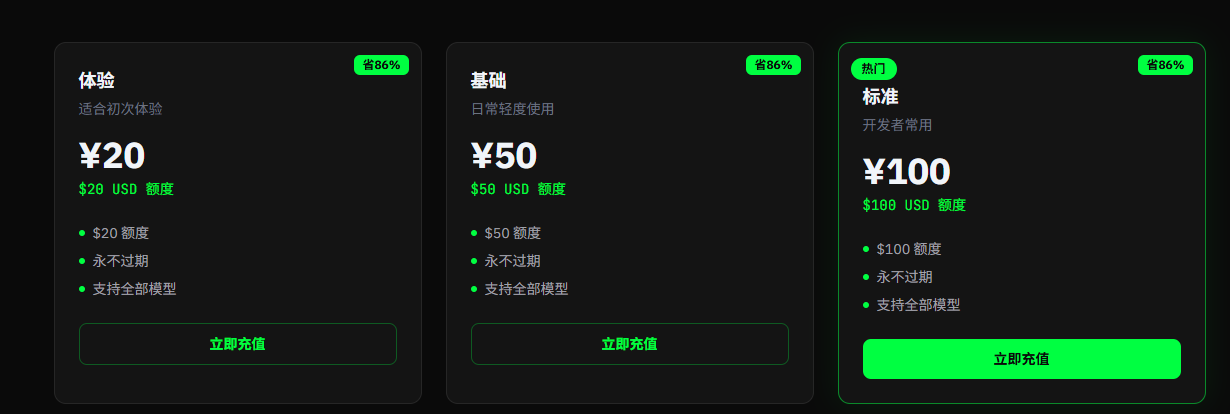
The main selling point of the transfer station is that API access can be obtained at a price far lower than the official one; for example, 1 RMB can purchase 1 USD of tokens, with a discount price being only about 15% of the official price. This is a tangible cost saving for users with significant demand.
Secondly, there is the access barrier. As access restrictions from American models towards users in mainland China become increasingly stringent, even disregarding price advantages, using the official API or package at the original price presents a very high verification barrier for many users. Additionally, in usage scenarios, if users want to simultaneously use Claude, GPT, Gemini, and domestic models, they need to switch between multiple platforms. The transfer station condenses this complexity into a single entry point, acting like an "aggregated socket" in the AI model world, where users no longer care about which line is connected behind, only whether it can stably provide power.
Thirdly, there is the push from development tools. In the past, models were primarily used for Q&A and writing; now, tools like Claude Code, Codex, and Cursor are integrating models into local development workflows. Model calls are no longer just a chat but may involve code review, project refactoring, or automatic fixes. Furthermore, compounded by the trend of "raising lobsters," the demand for such tokens is also increasing. The heavier the demand, the more likely users are to seek cheaper, higher quotas, and more unified access methods.
Therefore, the booming business of the transfer station is driven by real demand, not just another fad.
2. Do You Really Need the Transfer Station?
However, not everyone needs to use the transfer station.
If it’s just occasional questions, translating texts, summarizing public information, or writing ordinary copy, often there is no need for a transfer station. Models and tools like ChatGPT, Gemini, Antigravity all have free quotas. If users are unable to manage authentication and accounts, they can also choose among many model aggregators, some of which offer free quotas for daily use.
For light users, instead of handing data over to an unknown transfer station for "cheapness," it’s better to use up the free quotas of official and legitimate tools first. Free quotas can change, and specific limits should refer to the official pages of each platform, but this principle does not change: low-frequency demand does not need to rush into using a transfer station.
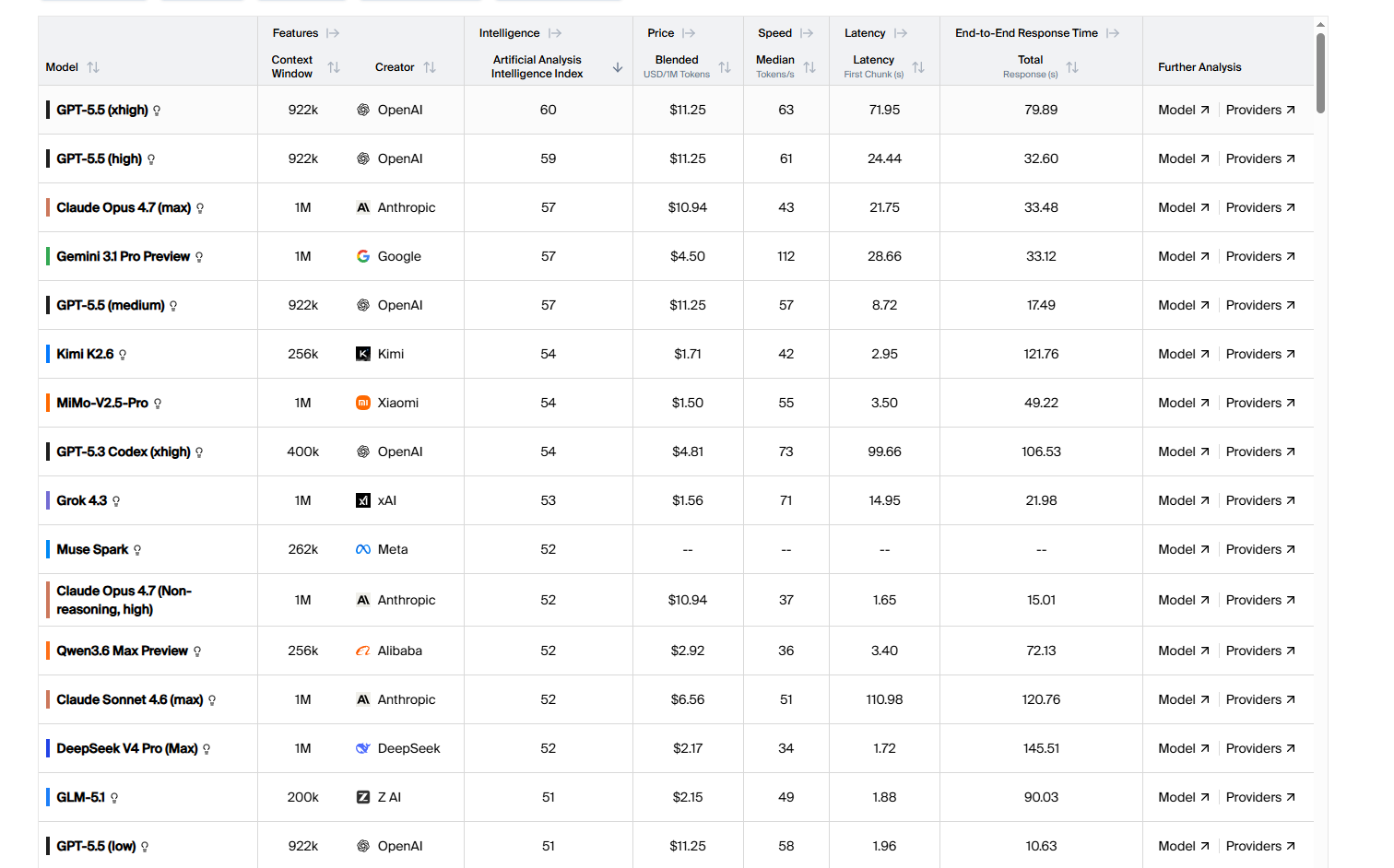
For heavy programming users, it is also not necessarily about handing over all tasks to expensive models or the transfer station. A more prudent approach is to use the models in layers: utilize stronger large models for requirement breakdown, technical routes, architectural design, and code review; then use cheaper domestic models for more specific function development, daily operations, etc. Furthermore, as domestic models continue to catch up, in the process of handling daily development, many domestic models have capabilities that are nearly comparable to top American models, and prices can often be significantly cheaper than those of transfer stations. For example, Kimi K2.6 has an output price of $4 per million tokens, which is only 13% of ChatGPT 5.5, and this price is lower than that of many transfer stations.
Of course, this approach is not perfect, but it aligns better with the cost structure. Complex tasks primarily require directional judgment and framework capabilities; specific implementations can be broken down into multiple low-risk, low-cost small tasks. For individual developers and small teams, breaking tasks down first and then deciding which segments require high-end models is often more rational than directly purchasing large quantities of transfer credits.
Only when users have ongoing, high-frequency, multi-model calling needs, such as long-term use of AI programming tools, dealing with large amounts of public information, conducting model comparisons, or setting up internal automation processes, and when official quotas are clearly insufficient, can the transfer station become a feasible alternative. Even so, it should be considered a "filtered tool," rather than a default entry point.
3. How to Select and Use the Transfer Station?
If after evaluation it is confirmed that a transfer station is needed, the next question is no longer "should I use it," but "how to use it without creating issues." Below is a complete operational process from assessment to daily usage.
Step 1: Verify First, Then Recharge
After obtaining a transfer station address, do not rush to recharge. First, do three things:
Verify model authenticity. Use the same prompt to call both the transfer station and the official API, comparing output quality, response format, and token usage for consistency. Some transfer stations may impersonate high-version models with lower version models or inject additional system prompts into outputs. A simple testing method is to have the model self-report version information and cross-reference it with official behavior; while this cannot completely prevent counterfeiting, it can filter out obviously problematic platforms.
Test latency and stability. Make 20-50 consecutive calls, observing for frequent timeouts, random errors, or fluctuations in response quality. The transfer station's link adds an extra layer compared to direct connections; if basic stability fails, problems during subsequent usage will only increase.
Check documentation quality. A well-operated transfer station typically provides complete API documentation, OpenAI format-compatible access instructions, and clear model and pricing lists. If a platform's documentation is pieced together or its model list is vague, one should be cautious.
Step 2: Isolate Configuration, Do Not Mix Usage
Once the platform is confirmed to be usable, the next step is technical isolation. Many users skip this step, but it determines the extent of potential losses when issues arise.
Use independent API keys. Do not directly input the key you obtained from the official platform into the transfer station, nor share the same key among multiple transfer stations. Generate independent keys for each transfer station; if an issue arises with one platform, it can be immediately discontinued without affecting other services.
Manage keys through environment variables. In the local development environment, store API keys in an .env file or system environment variables, and do not hard-code them into the code. For instance, when filling in the API Base URL and Key in Cursor’s settings, ensure these configurations are not submitted to the Git repository. If using command-line tools like Claude Code or Codex, check your shell configuration files to ensure keys do not appear in the version control history.
Set usage limits. Most legitimate transfer stations support setting monthly token quotas or consumption limits. The first thing after recharging should be to establish these limits. This not only controls costs but also adds a safety net. If your key is accidentally leaked, the usage limit can restrict losses.
Step 3: Establish a Habit of Data Classification
After completing technical configurations, the most critical aspect in daily use is to quickly make data classification judgments for each call. There is no need to write a security report every time, but it is important to develop a conditioned reflex to check.
Before sending, ask yourself one question: If this content appears on some public forum tomorrow, can I accept it?
If the answer is "yes," such as a summary of public data, general translations, technical discussions on open-source projects, or analyses of public documents, then the transfer station can be used directly.
If the answer is "not really, but the losses are controllable," such as internal meeting minutes, drafts of business documents, customer communication templates, or code snippets, then desensitize before sending. Specifically, this means replacing names with role codes ("Customer A," "Colleague B"), substituting specific amounts with ratios or ranges, changing internal numbers to placeholders, and removing database connection addresses, internal API endpoints, and unpublished business logic descriptions. This process does not take long, usually one or two minutes, but it can reduce risks from "potential issues" to "basically controllable."
If the answer is "absolutely not," such as private keys, mnemonic phrases, production environment keys, database passwords, unpublished financial data, customer privacy information, or entire private codebases, then do not submit it to any transfer station, no matter how safe it claims to be.
Step 4: AI Programming Tools Should Be Treated Separately
This point deserves special emphasis because the data exposure risks of AI programming tools are far greater than those of ordinary conversations.
When integrating a transfer station into tools like Cursor, Claude Code, or Cline, the model not only receives the prompts you actively input but may also include: the content of currently opened files, project directory structures, terminal output history, dependency configuration files (like package.json, requirements.txt), Git commit history, and file paths and environment variable names in error messages.
This means that a seemingly ordinary request like "help me fix this bug" may actually send significantly more data to the transfer station than you expect.
Operational advice: When using a transfer station within AI programming tools, prioritize handling independent code tasks that are unrelated to core business operations. If you must work on code involving private repositories or production environments, there are two relatively safe approaches: paste only desensitized code snippets instead of letting the tool read the entire project, or switch the development of sensitive projects back to the official API or local model while routing non-sensitive projects through the transfer station. Both methods are not perfect, but they are certainly better than indiscriminately handing the entire development context over to a third-party proxy.
Step 5: Continuous Monitoring, Be Prepared to Exit
Using a transfer station is not a one-time decision but a continuous assessment process.
Regularly check billing records. Confirm that token consumption matches your actual usage. If there is no significant increase in usage during a certain period but the billing rate accelerates, the platform may have adjusted its billing rules or your key may have anomalous calls.
Pay attention to platform announcements and community feedback. The operating status of a transfer station may change at any time, with upstream channel adjustments, quota policy changes, or sudden service shutdowns all being possibilities. If you rely on a particular transfer station as your primary access method, at least have an alternative option. It’s recommended to register on 2-3 platforms simultaneously and maintain minimal recharges to avoid concentrating all calls through a single channel.
Ensure portability. When configuring a transfer station, use standard interfaces compatible with OpenAI formats so that switching platforms usually only requires changing the Base URL and API Key, without altering code logic. If your project is deeply tied to a transfer station's private interface or special functions, the cost of migration will significantly increase, which is another risk to consider in advance.
Ultimately, a transfer station is a tool, not a belief. Its value lies in addressing real access needs at controllable costs, but this "controllable" needs to be defined and maintained by you, through verification, isolation, classification, specialized handling, and continuous monitoring, keeping control in your hands.
免责声明:本文章仅代表作者个人观点,不代表本平台的立场和观点。本文章仅供信息分享,不构成对任何人的任何投资建议。用户与作者之间的任何争议,与本平台无关。如网页中刊载的文章或图片涉及侵权,请提供相关的权利证明和身份证明发送邮件到support@aicoin.com,本平台相关工作人员将会进行核查。


